
How MacBook Air with Apple Silicon Competes with Windows Ultrabooks in 2025 | Expert Review

How MacBook Air with Apple Silicon Competes with Windows Ultrabooks
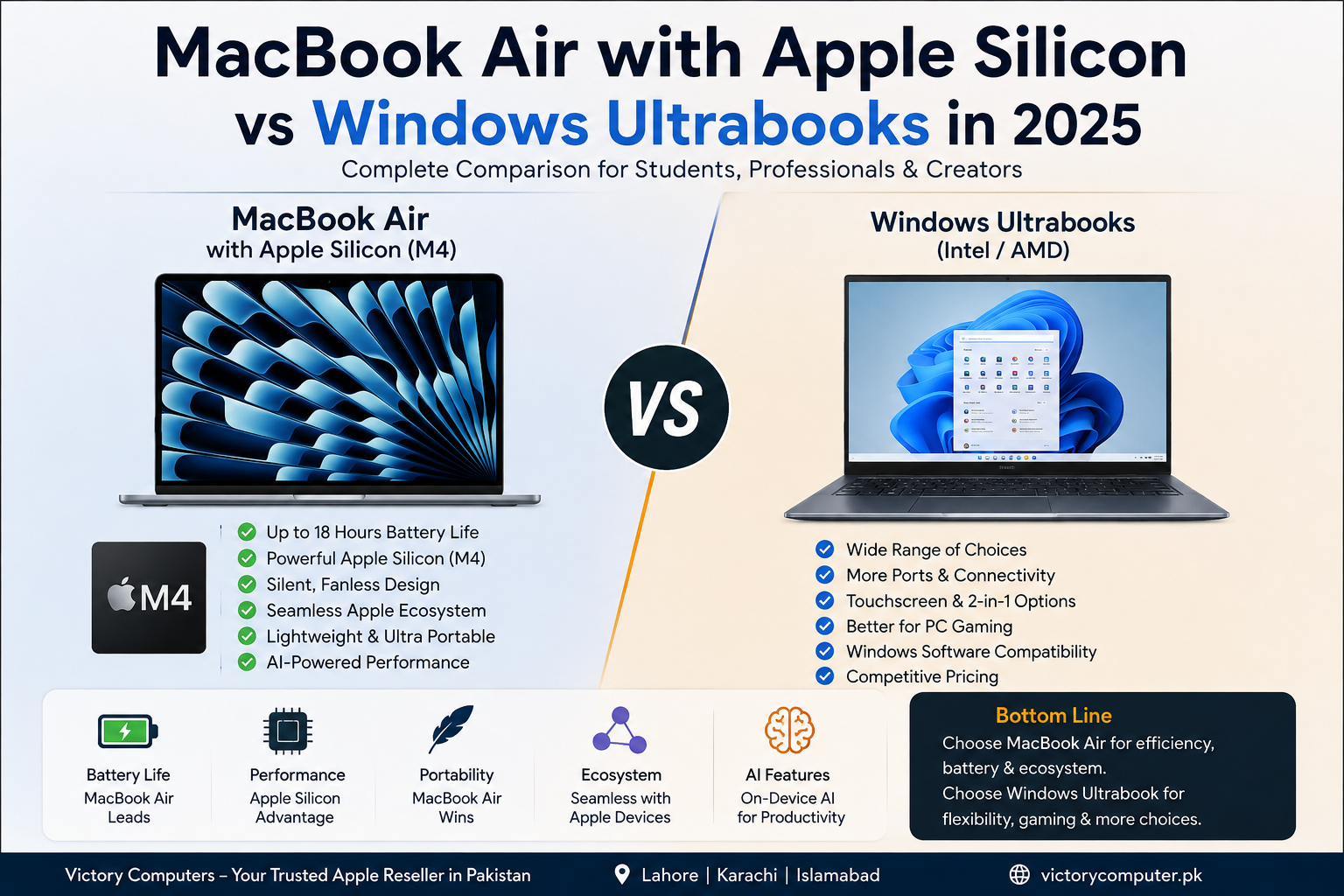
MacBook Air with Apple Silicon competed strongly with premium Windows ultrabooks in 2025 because of its efficient M-series architecture, long battery life, thin fanless design and close integration with macOS. Windows ultrabooks remained the better choice for users who needed broader software compatibility, more hardware choices, gaming flexibility or specific Windows-only business applications.
MacBook Air vs Windows Ultrabooks: Quick Comparison
The biggest difference is not simply macOS versus Windows. Buyers are choosing between two different hardware and software ecosystems. Apple controls the MacBook Air’s processor, operating system and much of its core software integration, while Windows ultrabooks offer a much wider range of processors, manufacturers, displays, ports and configurations.
| Area | MacBook Air with Apple Silicon | Windows Ultrabooks |
|---|---|---|
| Best For | Students, mobile professionals, Apple users and many creators | Business users, Windows-dependent professionals and buyers wanting more choice |
| Main Advantage | Efficiency and ecosystem integration | Hardware and software flexibility |
| Battery | Strong battery performance | Varies significantly by model |
| AI | Neural Engine and Apple Intelligence support | Modern Copilot+ PCs use dedicated NPUs for local AI |
| Gaming | Not its primary strength | More game compatibility and hardware choices |
| Ports | Minimalist selection | Often broader, depending on model |
1. Apple Silicon Gives MacBook Air Excellent Performance per Watt
Apple Silicon is one of the main reasons the MacBook Air became such a serious ultrabook competitor. Instead of treating the processor, graphics and machine-learning acceleration as completely separate platforms, Apple combines major computing components into a tightly integrated system-on-a-chip design.
The 2025 MacBook Air with M4 moved this approach forward with a 10-core CPU, up to a 10-core GPU and a 16-core Neural Engine. The result is a laptop designed to deliver strong everyday performance without requiring a conventional cooling fan.
For web browsing, office applications, programming, university work, photo editing and moderate content creation, this efficiency is one of the MacBook Air’s strongest advantages.
2. Battery Life Remains a Major MacBook Air Advantage
Battery efficiency is another reason MacBook Air with Apple Silicon became popular with students and professionals.
Apple rated the 2025 M4 MacBook Air for up to 18 hours of video streaming and up to 15 hours of wireless web use under its test conditions. Actual battery life depends on brightness, applications, connectivity, workload and other settings.
Windows competition improved substantially, however. Modern Intel, AMD and Qualcomm-based premium laptops can also provide strong all-day mobility, so buyers should compare specific laptop models instead of assuming every MacBook automatically beats every Windows ultrabook.
3. MacBook Air Is Designed Around Portability
MacBook Air prioritizes a thin chassis, low weight, quiet operation and long unplugged use. Its fanless design also means there is no fan noise during normal or demanding workloads.
This combination is particularly useful for:
- University students carrying a laptop every day
- Freelancers working from different locations
- Business travellers
- Writers and bloggers
- Developers who prefer macOS
- Users already working with iPhone or iPad
Windows buyers can find similarly portable laptops, but the experience varies considerably between manufacturers and models.
4. AI Is No Longer an Apple-Only Advantage
The AI comparison changed significantly during 2025. Apple Silicon includes a Neural Engine designed for machine-learning workloads, while supported Macs can use Apple Intelligence features and applications can use Apple hardware acceleration for AI-related tasks.
However, it would be inaccurate to describe modern Windows ultrabooks as dependent mainly on cloud AI.
Copilot+ PCs represent a newer class of Windows 11 machines equipped with dedicated NPUs capable of more than 40 TOPS. Supported Windows experiences can perform tasks such as image processing, language operations and other AI workloads locally.
Point to remember: Apple has strong hardware-software integration for AI, while Windows now offers serious on-device AI capabilities across multiple processor platforms.
5. Apple Ecosystem Integration Is a Major Reason to Choose MacBook Air
The MacBook Air becomes more attractive when the buyer already owns other Apple devices.
Apple’s ecosystem can make it easier to move between a Mac, iPhone and iPad for everyday communication, files and productivity. This integrated experience is difficult to measure using benchmark numbers, but it can have a significant effect on daily convenience.
For someone who already uses an iPhone heavily, a MacBook Air can therefore offer more value than its processor specifications alone suggest.
Windows remains more flexible for users working in mixed-device environments or organizations built around Windows-specific management tools and applications.
6. Display and Everyday User Experience
The 2025 M4 MacBook Air was available in 13.6-inch and 15.3-inch versions. Apple’s Liquid Retina display provides 500 nits of brightness, wide P3 colour and support for one billion colours.
The weakness is choice.
Premium Windows ultrabooks can be purchased with a much broader selection of display technologies and configurations, depending on the manufacturer. Buyers may find touchscreen, OLED and high-refresh-rate options that better match a particular workload.
MacBook Air therefore offers a consistent display experience, while Windows gives buyers more freedom to select the exact screen characteristics they want.
7. Where Windows Ultrabooks Still Have the Advantage
Windows ultrabooks should not be treated as one single competing laptop. Dell, HP, Lenovo, ASUS and other manufacturers offer machines covering different budgets, display sizes, processors and business requirements.
That diversity creates several advantages:
- More hardware configurations
- Broader Windows software compatibility
- More touchscreen options
- More port configurations on selected models
- Greater gaming compatibility
- More manufacturer and price choices
- Different upgrade and repair options depending on model
A Windows ultrabook can therefore be the more practical purchase when a specific application, peripheral, game or corporate environment requires Windows.
Pros and Cons of MacBook Air with Apple Silicon
Pros
- Excellent efficiency: Apple Silicon delivers strong performance without requiring a power-hungry design.
- Long battery life: Well suited to mobile work and university use.
- Silent operation: MacBook Air uses a fanless design.
- Apple ecosystem: Particularly attractive for iPhone and iPad users.
- Portable design: Thin and easy to carry for work, study and travel.
Cons
- Limited ports: Users with multiple accessories may require a hub or dock.
- Limited gaming suitability: Windows remains the stronger platform for broad PC game compatibility.
- Less hardware choice: Windows ultrabooks are available in far more configurations.
- Software limitations: Some specialized business, engineering or legacy Windows applications may require Windows.
Pros and Cons of Windows Ultrabooks
Pros
- Huge selection of manufacturers and configurations
- Strong compatibility with Windows applications
- More touchscreen, OLED and high-refresh display choices
- Better choice for many PC gamers
- Modern Copilot+ models provide dedicated on-device AI hardware
Cons
- Battery performance varies substantially between models
- Build quality and display quality are less consistent across the market
- Choosing between many processors and configurations can be confusing
- The overall experience depends heavily on the individual manufacturer and model
Why We Recommend MacBook Air with Apple Silicon
MacBook Air with Apple Silicon is particularly easy to recommend to students, writers, programmers, business travellers and Apple ecosystem users who prioritize battery life, portability and quiet operation.
It is not automatically the best laptop for everyone. Buyers dependent on Windows-only applications, PC gaming, touchscreens, specialized ports or highly specific hardware configurations should compare premium Windows ultrabooks before deciding.
MacBook Air or Windows Ultrabook: Who Should Buy Which?
Choose MacBook Air if:
- You already use an iPhone or iPad
- Battery life is a major priority
- You want a silent laptop
- You regularly travel or work away from a desk
- You prefer macOS
- Your essential applications support Apple Silicon
Choose a Windows ultrabook if:
- You require Windows-specific applications
- You want touchscreen or convertible options
- PC gaming matters
- You need a particular selection of ports
- You want more brands and configurations to compare
- Your company is standardized around Windows
MacBook Air vs Windows Ultrabooks for Students
Students should choose based on course requirements rather than brand popularity.
A MacBook Air is attractive for general university work, coding, writing, research, presentations and portable everyday use. However, engineering, architecture, accounting or other specialized courses may require applications that work better on Windows or are only available for Windows.
Before buying: check the software required by your university or degree program.
MacBook Air vs Windows Ultrabooks for Professionals
For professionals, software compatibility should be the first question.
MacBook Air works particularly well for office productivity, programming, communication, writing and many creative workflows. Windows ultrabooks can be a safer choice in organizations dependent on Windows-specific applications, enterprise systems or peripherals.
Neither platform is universally better. The correct choice depends on the applications that generate your actual work.
Buying MacBook Air in Pakistan: What Should You Check?
Pakistani buyers should compare more than the headline price. Check the exact model, memory, storage, keyboard configuration, warranty terms and seller support before purchasing an imported MacBook or Windows ultrabook.
For MacBook Air, choosing sufficient unified memory and storage at purchase is especially important because buyers should not assume these components can later be upgraded like conventional replaceable laptop parts.
Victory Computer in Lahore provides laptops and computing products for customers who want to compare MacBook and Windows options before buying. Buyers outside Lahore can also confirm current availability and delivery options directly with the store before placing an order.
Final Verdict: Is MacBook Air Better Than a Windows Ultrabook?
MacBook Air with Apple Silicon is one of the strongest choices for buyers who value efficiency, battery life, portability, quiet operation and integration with Apple devices.
Windows ultrabooks win on choice. They provide more manufacturers, more display technologies, broader gaming support, diverse port configurations and access to the full Windows software ecosystem.
The decision is therefore straightforward: choose MacBook Air for efficiency, portability and the Apple ecosystem; choose a Windows ultrabook when compatibility, gaming, hardware variety or specialized Windows features matter more.
Frequently Asked Questions
Is MacBook Air with Apple Silicon better than Windows ultrabooks?
MacBook Air can be better for battery efficiency, silent operation, portability and Apple ecosystem integration. Windows ultrabooks can be better for software compatibility, gaming, hardware choice and specialized configurations.
Does MacBook Air M4 have good battery life?
Yes. Apple rates the 2025 M4 MacBook Air for up to 18 hours of video streaming and up to 15 hours of wireless web use under its test conditions. Real-world results vary by workload and settings.
Is MacBook Air good for students?
Yes, particularly for students prioritizing portability and battery life. Students should still check university software requirements before choosing macOS over Windows.
Are Windows ultrabooks better for gaming?
Generally, Windows provides broader PC game compatibility and more gaming-oriented hardware choices. MacBook Air is primarily designed as a thin productivity laptop rather than a gaming notebook.
Do Windows ultrabooks have on-device AI?
Yes. Modern Copilot+ PCs include dedicated NPUs with more than 40 TOPS of AI processing capability and support multiple Windows features that can process AI workloads locally.
Should I buy a MacBook Air or Windows laptop in Pakistan?
Choose based on required software, battery needs, portability, warranty, configuration and budget. MacBook Air is especially attractive to Apple ecosystem users, while Windows offers a much wider selection of devices.
Lorem ipsum dolor sit amet, consectetur adipiscing elit. Ut elit tellus, luctus nec ullamcorper mattis, pulvinar dapibus leo.

About Victory Computer Editorial Team
Victory Computer Editorial Team The Victory Computer Editorial Team publishes informative, research-based content about laptops, computers, monitors, printers, hardware, and technology trends in Pakistan. Our goal is to help readers understand product specifications, compare available options, and make informed purchasing decisions.
View all posts by Victory Computer Editorial Team
3 thoughts on “How MacBook Air with Apple Silicon Competes with Windows Ultrabooks in 2025 | Expert Review”