
The Evolution of MacBook Pro Keyboards: From Butterfly Mechanism to Latest Design | Expert Review

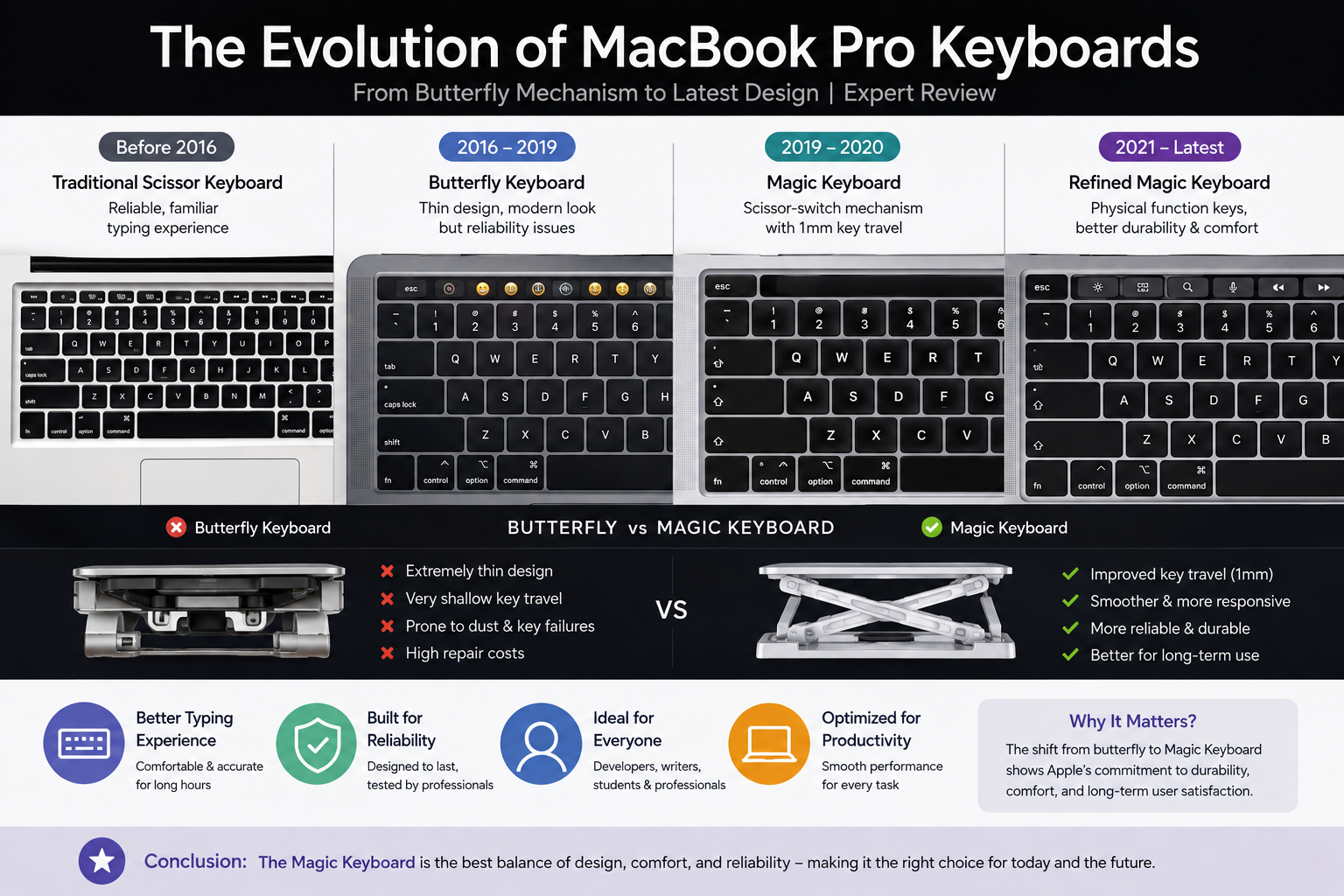
The Evolution of MacBook Pro
The evolution of MacBook Pro keyboards is one of the most significant design stories in Apple’s notebook history. Apple moved from traditional scissor-switch keyboards to the controversial butterfly mechanism in 2016, then returned to a redesigned scissor mechanism with the Magic Keyboard beginning in 2019. The result is a more conventional keyboard design focused on typing comfort, stability and practical physical controls.
For MacBook Pro buyers, especially those considering an older used model, understanding these keyboard generations matters. A 2017 MacBook Pro and a newer Magic Keyboard model may look similar at first glance, but their keyboard mechanisms, typing characteristics and reliability histories are very different.
MacBook Pro Keyboard Evolution Timeline
The MacBook Pro keyboard evolution can be divided into three important periods: traditional scissor keyboards, the butterfly-keyboard era and the return to the scissor mechanism through Apple’s Magic Keyboard.
| Period | Keyboard Design | Major Change | Main Trade-off |
|---|---|---|---|
| Before 2016 | Traditional Scissor Keyboard | Conventional key travel and familiar notebook typing experience | Required more vertical space than the later butterfly mechanism |
| 2016–2019 | Butterfly Keyboard | Very thin mechanism with shallow key travel | Reliability became a significant concern |
| 2019–2020 | Magic Keyboard | Redesigned scissor mechanism with 1 mm key travel | Moved away from Apple’s extremely thin butterfly approach |
| 2021 onward | Refined Magic Keyboard | Physical function-key row on redesigned MacBook Pro models | Touch Bar was removed from the redesigned 14-inch and 16-inch models |
The Butterfly Keyboard Era: Why Did Apple Change the MacBook Keyboard?
Apple developed the butterfly mechanism as part of its effort to make notebook keyboards thinner while improving key stability. The mechanism first appeared in the 12-inch MacBook in 2015 before a second-generation version arrived on the redesigned MacBook Pro in 2016.
Apple said its original butterfly mechanism was substantially thinner than a traditional scissor mechanism while providing greater key stability. This allowed the keyboard assembly to occupy less vertical space inside the notebook.
The 2016 MacBook Pro brought this philosophy to Apple’s professional notebook lineup. Alongside the butterfly keyboard, Apple introduced a thinner enclosure and, on selected configurations, the Touch Bar.
The typing experience was noticeably different from previous MacBook Pro keyboards. Butterfly keys had extremely shallow travel and a firm response. Some users liked the precise, low-profile feel, while others preferred the greater movement of traditional scissor-switch keyboards.
What Was the Butterfly Keyboard Designed to Achieve?
The butterfly mechanism focused on three main design goals:
- Reduce the thickness of the keyboard assembly.
- Provide greater key stability across the surface of each key.
- Support Apple’s increasingly thin notebook designs.
From an engineering perspective, the butterfly mechanism helped Apple reduce keyboard thickness. The problem was that the design later became associated with keyboard reliability concerns across several MacBook generations.
Why Did the MacBook Pro Butterfly Keyboard Become Controversial?
The biggest problem with the butterfly era was not simply typing preference. Reliability became a major concern.
Apple eventually established a Keyboard Service Program covering eligible MacBook, MacBook Air and MacBook Pro models. Apple acknowledged that a small percentage of keyboards in certain models could exhibit problems such as letters or characters repeating unexpectedly, characters failing to appear, or keys feeling sticky and responding inconsistently.
This reliability history is particularly relevant today because many butterfly-keyboard MacBook Pro models remain available in the used and refurbished market.
Common Butterfly Keyboard Concerns
- Keys repeating unexpectedly.
- Keystrokes sometimes failing to register.
- Keys feeling sticky or inconsistent.
- Very shallow travel that some users found uncomfortable.
- Potential repair concerns when buying an older used MacBook Pro.
Apple revised the butterfly mechanism across multiple generations, but the company eventually abandoned the design and returned to a scissor-based keyboard.
The Return of the Magic Keyboard
A major turning point in MacBook Pro keyboard history came with the 16-inch MacBook Pro introduced in November 2019. Apple replaced the butterfly mechanism with a redesigned scissor mechanism called the Magic Keyboard.
The 2019 Magic Keyboard offered 1 mm of key travel and introduced several changes aimed at creating a more familiar physical keyboard experience.
Important Magic Keyboard Changes
- Redesigned scissor-switch mechanism.
- 1 mm of key travel.
- Physical Escape key.
- Inverted-T arrow-key arrangement.
- Improved conventional key movement compared with the butterfly mechanism.
The Touch Bar and Touch ID remained on the 2019 16-inch MacBook Pro, but the return of a physical Escape key was particularly useful for programmers and other users who frequently relied on that key.
Apple continued the transition in May 2020 when it updated the 13-inch MacBook Pro with Magic Keyboard. Apple stated at the time that its entire notebook lineup was then equipped with Magic Keyboard.
That effectively ended the butterfly-keyboard era for new Mac notebooks.
How the MacBook Pro Keyboard Design Evolved Further
The next important stage of the MacBook Pro keyboard evolution arrived with the redesigned 14-inch and 16-inch MacBook Pro models introduced in 2021.
Apple retained the scissor-based Magic Keyboard but changed the controls above the main keyboard. The Touch Bar was removed from these redesigned models and replaced with a full-height row of physical function keys.
The keyboard also included a larger physical Escape key and Touch ID.
Why Are Physical Function Keys Important?
Physical function keys can be especially useful for developers, writers, editors and other professionals who rely heavily on keyboard shortcuts. A physical key has a fixed location and tactile response, allowing frequently used controls to be accessed without looking at a changing touch interface.
This design represented a broader shift in MacBook Pro philosophy. Instead of emphasizing the Touch Bar as an alternative input system, Apple returned to familiar physical controls while retaining modern features such as Touch ID.
Butterfly Keyboard vs Magic Keyboard: What Is the Difference?
The most important difference between the two generations is the underlying mechanism. Butterfly keyboards were designed around minimal thickness and very shallow movement, while the Magic Keyboard returned to a redesigned scissor mechanism.
| Feature | Butterfly Keyboard | Magic Keyboard |
|---|---|---|
| Mechanism | Butterfly mechanism | Scissor mechanism |
| Key Travel | Very shallow | 1 mm on the 2019 Magic Keyboard redesign |
| Typing Character | Firm and low-profile | More conventional notebook-keyboard movement |
| Physical Escape Key | Varied depending on model and Touch Bar configuration | Restored on the 2019 16-inch MacBook Pro |
| Reliability History | Eligible models were covered by Apple’s Keyboard Service Program | Moved away from the problematic butterfly mechanism |
| Current Relevance | Mostly found on older used MacBook models | Foundation of modern MacBook Pro keyboards |
Pros and Cons of the Modern MacBook Pro Magic Keyboard
The current Magic Keyboard approach solves several of the biggest concerns associated with the butterfly generation, but it is not necessarily perfect for every type of user.
Pros
- More conventional typing feel: The scissor mechanism provides greater key movement than the extremely shallow butterfly design.
- Better reliability history: The modern design moves away from the butterfly mechanism associated with Apple’s Keyboard Service Program.
- Physical Escape key: A dedicated Escape key is particularly useful for developers and keyboard-heavy professional applications.
- Physical function-key row: Redesigned MacBook Pro models provide tactile function controls instead of relying on the Touch Bar.
- Touch ID integration: Fingerprint authentication remains conveniently accessible directly from the keyboard area.
Cons
- Key travel is still relatively limited: Users accustomed to full-size mechanical keyboards may prefer deeper key movement.
- No dedicated numeric keypad: MacBook Pro keyboards do not provide a separate number pad, even on larger models.
- Integrated notebook design: Repairing an internal laptop keyboard is naturally more involved than replacing an external keyboard.
- Typing preference remains subjective: Some users may still prefer external mechanical or ergonomic keyboards for long working sessions.
Why We Recommend the Magic Keyboard Design
The Magic Keyboard generation is the more sensible choice for most MacBook Pro buyers. The scissor mechanism provides a more conventional typing experience while avoiding the butterfly mechanism used in affected older models.
Writers, programmers, students and office professionals who spend hours typing should generally prioritize a Magic Keyboard-equipped MacBook Pro when comparing otherwise similar machines.
Is the MacBook Pro Keyboard Good for Developers and Writers?
The modern MacBook Pro keyboard is well suited to keyboard-heavy work because it combines physical function keys, a dedicated Escape key, Touch ID and a consistent notebook keyboard layout.
Developers can benefit from the physical Escape and function keys when working with development environments, terminal applications and keyboard shortcuts. Writers and students may appreciate the more conventional movement of the scissor mechanism compared with the butterfly keyboard.
However, typing comfort is personal. Someone who spends an entire working day at a desk may still prefer connecting a full-size mechanical or ergonomic keyboard.
Should You Buy an Older Butterfly Keyboard MacBook Pro?
An older butterfly-keyboard MacBook Pro is not automatically a bad purchase, but it requires more careful inspection than a newer Magic Keyboard model.
Many older Intel MacBook Pro models are available through used and refurbished channels. Their prices can make them attractive to budget-conscious buyers, but the condition of the keyboard should be treated as an important part of the purchase decision.
Check These Things Before Buying
- Test every letter and number key.
- Test Shift, Command, Option and Control keys.
- Check the Escape key or Touch Bar controls where applicable.
- Look for repeated characters while typing.
- Check whether any keystrokes fail to register.
- Test keys for sticky or inconsistent movement.
- Confirm the exact MacBook Pro model and year.
- Check battery health and overall physical condition.
- Ask about previous repairs where that information is available.
The keyboard should not be evaluated in isolation. Battery condition, display quality, ports, storage, processor generation and repair history can all affect the value of an older MacBook Pro.
For more detailed second-hand purchasing considerations, see the used MacBook Pro buying guide for Pakistan.
Magic Keyboard or Butterfly Keyboard: Which Should You Choose?
For most users, the answer is straightforward: choose a MacBook Pro with Magic Keyboard when the alternatives are otherwise comparable.
The Magic Keyboard provides a scissor mechanism, more conventional key movement and a better reliability history than the butterfly generation.
A butterfly-keyboard MacBook Pro may still make sense when the machine is significantly cheaper, has been carefully inspected and meets the buyer’s performance requirements. However, keyboard condition needs to be part of the buying decision rather than an afterthought.
If you are deciding between Apple’s notebook families rather than individual keyboard generations, our MacBook Air vs MacBook Pro comparison explains how the two lines differ for different types of users.
MacBook Pro Buying Advice for Pakistan
For buyers in Pakistan, identifying the exact MacBook Pro generation is especially important when shopping for used or refurbished machines. Different Intel-era MacBook Pro models can look similar while using different keyboard generations.
Do not judge a used MacBook Pro only by processor, RAM and storage. Check the model year, keyboard mechanism, battery condition, display, ports and repair history as part of the complete evaluation.
For a newer MacBook Pro, compare the processor generation, unified memory, storage, display size, ports and warranty terms alongside keyboard design. Current pricing and availability should always be confirmed at the time of purchase because configurations and inventory can change.
Customers comparing MacBook and computer options can browse Victory Computer or contact the Lahore store for current product information.
What Did Apple Learn From the Butterfly Keyboard Era?
The transition from butterfly switches back to a scissor mechanism shows how notebook design involves trade-offs. Making one component thinner can provide engineering advantages, but usability and long-term reliability remain critical for a device used every day.
The butterfly mechanism demonstrated Apple’s willingness to rethink an established component. The later Magic Keyboard demonstrated that a more conventional mechanism could better balance notebook dimensions with practical typing requirements.
For buyers, the history also provides a useful lesson: a newer-looking design is not automatically better in every respect. Reliability, ergonomics and repair considerations matter alongside thinness and appearance.
Frequently Asked Questions
When did Apple introduce the butterfly keyboard on MacBook Pro?
Apple introduced a second-generation butterfly keyboard with the redesigned MacBook Pro in 2016. The original butterfly mechanism first appeared on the 12-inch MacBook in 2015.
Why was the MacBook butterfly keyboard discontinued?
Apple eventually moved away from the butterfly design after several generations. Eligible butterfly-keyboard Mac models were covered by Apple’s Keyboard Service Program for issues including repeating characters, missing keystrokes and sticky or inconsistent keys.
When did MacBook Pro get the Magic Keyboard?
The 16-inch MacBook Pro introduced the redesigned Magic Keyboard in November 2019. Apple brought Magic Keyboard to the 13-inch MacBook Pro in May 2020.
Does the MacBook Pro Magic Keyboard use butterfly switches?
No. The Magic Keyboard introduced on the 16-inch MacBook Pro uses a redesigned scissor mechanism rather than the butterfly mechanism.
Is Magic Keyboard better than the butterfly keyboard?
For most buyers, Magic Keyboard is the preferable design because it offers a more conventional typing experience and avoids the butterfly mechanism associated with Apple’s keyboard service program.
Should I avoid every butterfly-keyboard MacBook Pro?
Not necessarily. A well-priced older MacBook Pro can still be useful, but buyers should test the keyboard carefully and consider battery condition, repair history and overall hardware age before purchasing.
Final Verdict: MacBook Pro Keyboard Evolution
The MacBook Pro keyboard evolution moved from traditional scissor keyboards to the ultra-thin butterfly mechanism and ultimately back to a redesigned scissor system with the Magic Keyboard.
The butterfly mechanism was an ambitious attempt to reduce keyboard thickness and increase key stability, but its reliability history became a major weakness. Apple’s 2019 Magic Keyboard marked the turning point by restoring a scissor mechanism, 1 mm key travel and a physical Escape key. The redesigned MacBook Pro models introduced in 2021 further emphasized physical controls with a full-height function-key row.
For most buyers today, a Magic Keyboard-equipped MacBook Pro is the better choice, particularly when typing comfort and long-term reliability are priorities. Older butterfly-keyboard models can still be considered when the price and condition make sense, but the keyboard should be thoroughly tested before purchase.
For current MacBook and computer options in Pakistan, visit Victory Computer or contact the team on WhatsApp at 0300 9466881 for current product, warranty and availability information.

About Victory Computer Editorial Team
Victory Computer Editorial Team The Victory Computer Editorial Team publishes informative, research-based content about laptops, computers, monitors, printers, hardware, and technology trends in Pakistan. Our goal is to help readers understand product specifications, compare available options, and make informed purchasing decisions.
View all posts by Victory Computer Editorial Team