
Apple Silicon Journey: From M1 to M4 Explained | Victory Computer

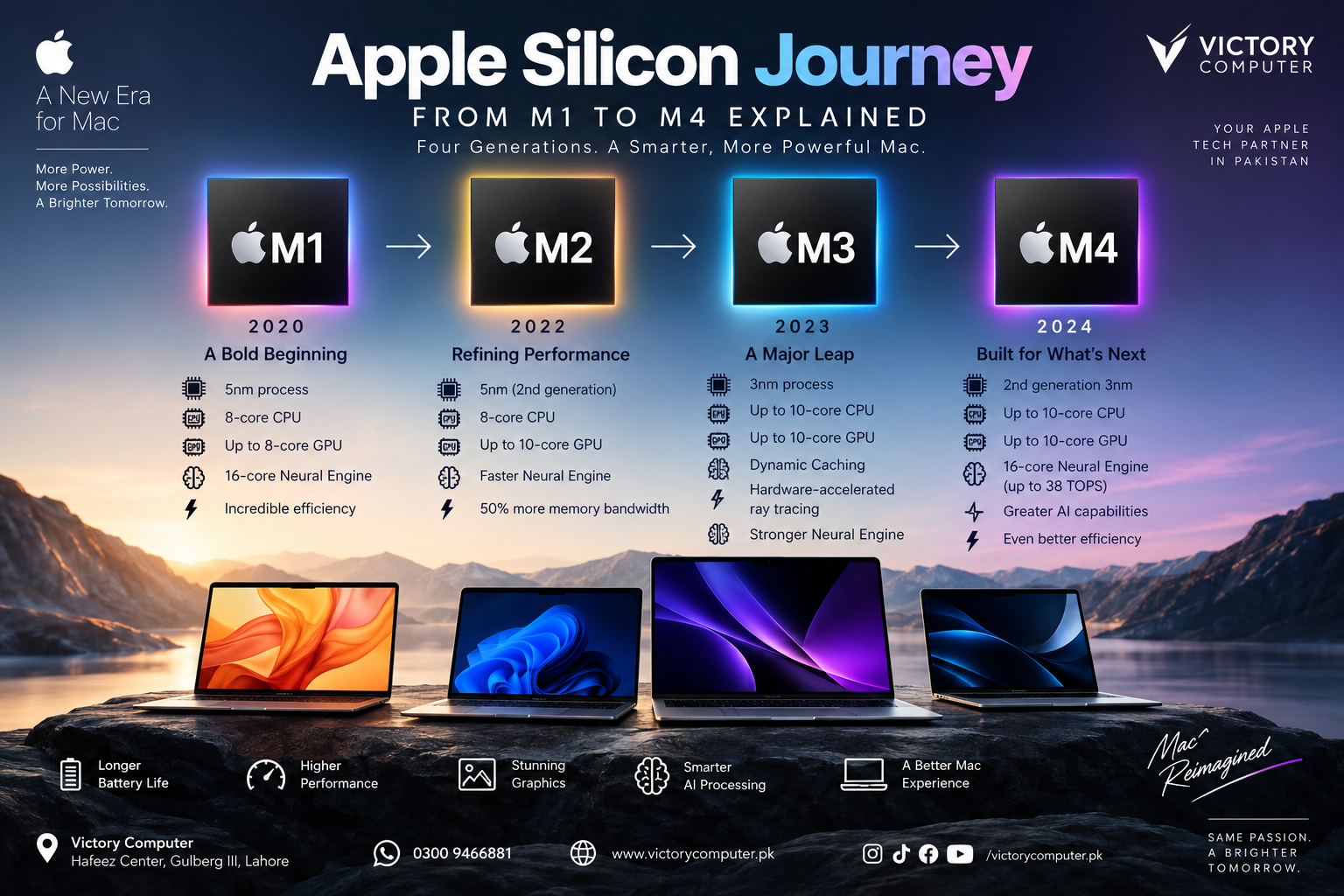
Apple Silicon Journey:
The Apple Silicon Journey from M1 to M4 transformed the Mac by combining CPU, GPU, unified memory, media processing, and machine-learning hardware into Apple’s own system-on-a-chip designs. M1 began the Mac transition in 2020, while M2, M3, and M4 progressively improved performance, graphics, memory capabilities, efficiency, and AI acceleration.
What Is Apple Silicon?
Apple Silicon is Apple’s family of system-on-a-chip designs used across Macs and other Apple devices. For the Mac, the transition marked a move away from Intel processors toward chips designed by Apple around its own hardware and software requirements.
Instead of treating the CPU, graphics and several supporting processors as largely separate components, Apple Silicon integrates major functions into one SoC and uses a unified memory architecture. The result is a platform designed around performance per watt, tight macOS integration and efficient sharing of memory resources.
M1: Where the Apple Silicon Journey Started
The Mac-focused Apple Silicon Journey began with M1 in November 2020. M1 was Apple’s first chip designed specifically for the Mac and used a 5-nanometer manufacturing process with 16 billion transistors. The original M1 included an 8-core CPU, up to an 8-core GPU and a 16-core Neural Engine.
M1 mattered because it demonstrated that a thin MacBook could deliver strong everyday performance without relying on the traditional Intel architecture. Apple initially introduced M1 in the MacBook Air, 13-inch MacBook Pro and Mac mini.
For everyday browsing, office applications, study, coding and moderate creative work, M1 represented a major change in how Mac performance and efficiency could be balanced.
M2: Refining the Apple Silicon Formula
Apple introduced M2 in June 2022 as the second generation of its M-series architecture for Mac. M2 retained an 8-core CPU but offered a GPU with up to 10 cores, up to 24GB of unified memory and 100GB/s of unified memory bandwidth.
According to Apple’s launch comparisons, M2 offered an 18% faster CPU, up to 35% higher GPU performance at maximum power and 50% more memory bandwidth than M1. Those figures are Apple measurements under specified test conditions rather than universal performance gains for every application.
The practical improvement was greater headroom for multitasking, larger projects and graphics-heavy workloads. M2 also strengthened media capabilities with hardware support aimed at demanding video workflows.
M3: A Major Graphics Upgrade
The Apple Silicon Journey took another significant step in October 2023 with M3. Apple introduced M3, M3 Pro and M3 Max together, with the family moving to a 3-nanometer manufacturing process.
M3 was particularly important for graphics. The new GPU architecture introduced Dynamic Caching along with hardware-accelerated ray tracing and mesh shading. These technologies gave compatible professional applications and games access to graphics capabilities that earlier M-series generations did not provide in hardware.
This made M3 especially relevant to buyers working with 3D graphics, creative applications and GPU-intensive workflows. It also demonstrated that Apple was putting increasing emphasis on GPU architecture rather than relying only on incremental CPU improvements.
M4: Greater Performance and AI Capability
Apple introduced the original M4 in May 2024 in the iPad Pro before bringing the M4 family to MacBook Pro later that year. M4 uses second-generation 3-nanometer technology and includes an up-to-10-core CPU and 10-core GPU in the original configuration.
One of M4’s most notable improvements is its Neural Engine. Apple rates the 16-core Neural Engine at up to 38 trillion operations per second. M4 also builds on the GPU architecture introduced with M3, retaining technologies such as Dynamic Caching and hardware-accelerated ray tracing.
By 2025, M4 also reached MacBook Air. The M4 MacBook Air supports up to 32GB of unified memory and can drive two external displays in addition to its built-in screen. That makes M4 relevant not only for demanding professional work but also for users who want greater long-term performance headroom.
M1 vs M2 vs M3 vs M4: Quick Comparison
| Chip | Introduced | Process | Major Development | Good Fit For |
|---|---|---|---|---|
| M1 | 2020 | 5nm | First Apple-designed Mac chip and unified memory architecture | Study, office work and everyday computing |
| M2 | 2022 | Second-generation 5nm | Higher CPU/GPU performance and memory bandwidth | Multitasking and moderate creative work |
| M3 | 2023 | 3nm | Dynamic Caching and hardware ray tracing | Creative and graphics-heavy workflows |
| M4 | 2024 | Second-generation 3nm | Faster Neural Engine and further CPU/GPU development | Professional, creative and AI-assisted workloads |
The table shows why M1 vs M2 vs M3 vs M4 cannot be reduced to a simple speed ranking. Each generation added capabilities as well as performance, and the value of those changes depends heavily on the software and workload being used.
Apple Silicon Pros and Cons
Pros
- Strong performance per watt: Apple Silicon allows MacBooks to combine high performance with efficient power use.
- Unified memory architecture: CPU, GPU and other processing components can work from a shared memory pool.
- Integrated media engines: Newer generations provide dedicated hardware for demanding video workflows.
- Improved graphics: M3 and M4 include hardware-accelerated ray tracing and Dynamic Caching.
- Dedicated AI acceleration: Every M-series generation includes a Neural Engine, with M4 substantially increasing its processing capability.
Cons
- Memory and storage are generally not user-upgradeable: Buyers should choose the required configuration before purchase.
- Some older or specialized software may require compatibility checks: Legacy Intel-focused workflows can depend on Rosetta 2 or updated native applications.
- Gaming support remains software-dependent: Strong GPU hardware does not automatically mean every Windows game is available on macOS.
- Newer is not always necessary: An M4 Mac can be excessive for users whose workload is limited to browsing, documents, streaming and basic study tasks.
Why We Recommend Choosing by Workload, Not Generation
The Apple Silicon Journey shows steady technical progress, but buying the newest generation is not automatically the best financial decision. An M1 or M2 Mac can still make sense for straightforward productivity, while M3 and M4 become more attractive as graphics, professional applications, AI-assisted tasks and demanding multitasking become more important.
Configuration matters as well. For some professional users, additional unified memory or storage may provide more practical value than moving up one processor generation.
Which Apple Silicon Chip Should You Choose?
Choose M1 mainly when buying an older or used Mac at an attractive price and your needs are relatively light.
Choose M2 if you want more performance than M1 while keeping costs below newer configurations. M2 remains suitable for productivity, coding and moderate creative workloads.
Choose M3 if graphics improvements such as hardware-accelerated ray tracing matter or you find a well-configured M3 MacBook at a competitive price.
Choose M4 if you want stronger current-generation performance, more AI-processing capability and greater headroom for demanding creative or professional workloads.
Buying an Apple Silicon MacBook in Pakistan
For buyers in Pakistan, compare the exact MacBook model rather than shopping only by the M-series name. Screen size, unified memory, SSD capacity, battery condition on used machines, keyboard layout and warranty terms can materially change the value of two MacBooks using the same processor generation.
Victory Computer in Lahore offers MacBook options for buyers comparing different Apple Silicon generations. Before ordering, confirm the exact model, configuration, current price, warranty terms and availability because inventory and pricing can change.
The broader Apple Silicon Journey also means older models should not automatically be dismissed. A correctly priced M2 or M3 MacBook with sufficient memory can sometimes be a better fit than paying more for an M4 configuration whose additional performance will rarely be used.
Frequently Asked Questions
When did Apple Silicon start on the Mac?
Apple introduced M1 for Mac in November 2020, beginning the transition from Intel processors to Apple’s own Mac-focused chips.
What is the biggest difference between M1 and M4?
M4 combines newer CPU and GPU architectures, second-generation 3nm manufacturing, hardware-accelerated ray tracing and a substantially more capable Neural Engine. Actual performance differences vary by Mac model and workload.
Is an M1 Mac still worth buying?
An M1 Mac can still be practical for study, office work and everyday computing if the condition, memory, storage, software support and price make sense. Buyers should compare it carefully with newer M2 and M3 options.
Is M3 much better than M2 for graphics?
M3 introduced a new GPU architecture with Dynamic Caching, hardware-accelerated ray tracing and mesh shading. Those capabilities can matter more in compatible graphics-intensive applications than in ordinary productivity work.
Should I upgrade from M1 to M4?
Upgrade if your current M1 Mac limits demanding editing, development, graphics or AI-assisted workflows, or if you need features available on a newer Mac. For basic productivity, an M1 system may continue to meet your needs.
Which Apple Silicon generation is best for professional work?
M4 provides the strongest capabilities among M1 through M4, but professionals should also compare M4 Pro and M4 Max systems where workloads require more CPU, GPU, memory bandwidth or unified memory capacity.
Final Recommendation
The Apple Silicon Journey from M1 to M4 is a progression from Apple’s first highly efficient Mac SoC to increasingly capable CPU, GPU, media and machine-learning architectures. M1 remains useful for lighter workloads, M2 offers a balanced step forward, M3 introduced important graphics technologies, and M4 provides the strongest overall capabilities of these four base generations.
The best choice is therefore not automatically the newest chip. Match the processor generation, unified memory, storage and MacBook model to the applications you actually use, then compare current pricing and warranty terms before buying.

About Victory Computer Editorial Team
Victory Computer Editorial Team The Victory Computer Editorial Team publishes informative, research-based content about laptops, computers, monitors, printers, hardware, and technology trends in Pakistan. Our goal is to help readers understand product specifications, compare available options, and make informed purchasing decisions.
View all posts by Victory Computer Editorial Team
10 thoughts on “Apple Silicon Journey: From M1 to M4 Explained | Victory Computer”