
The Evolution of Laptop Graphics Cards (2020–2025)

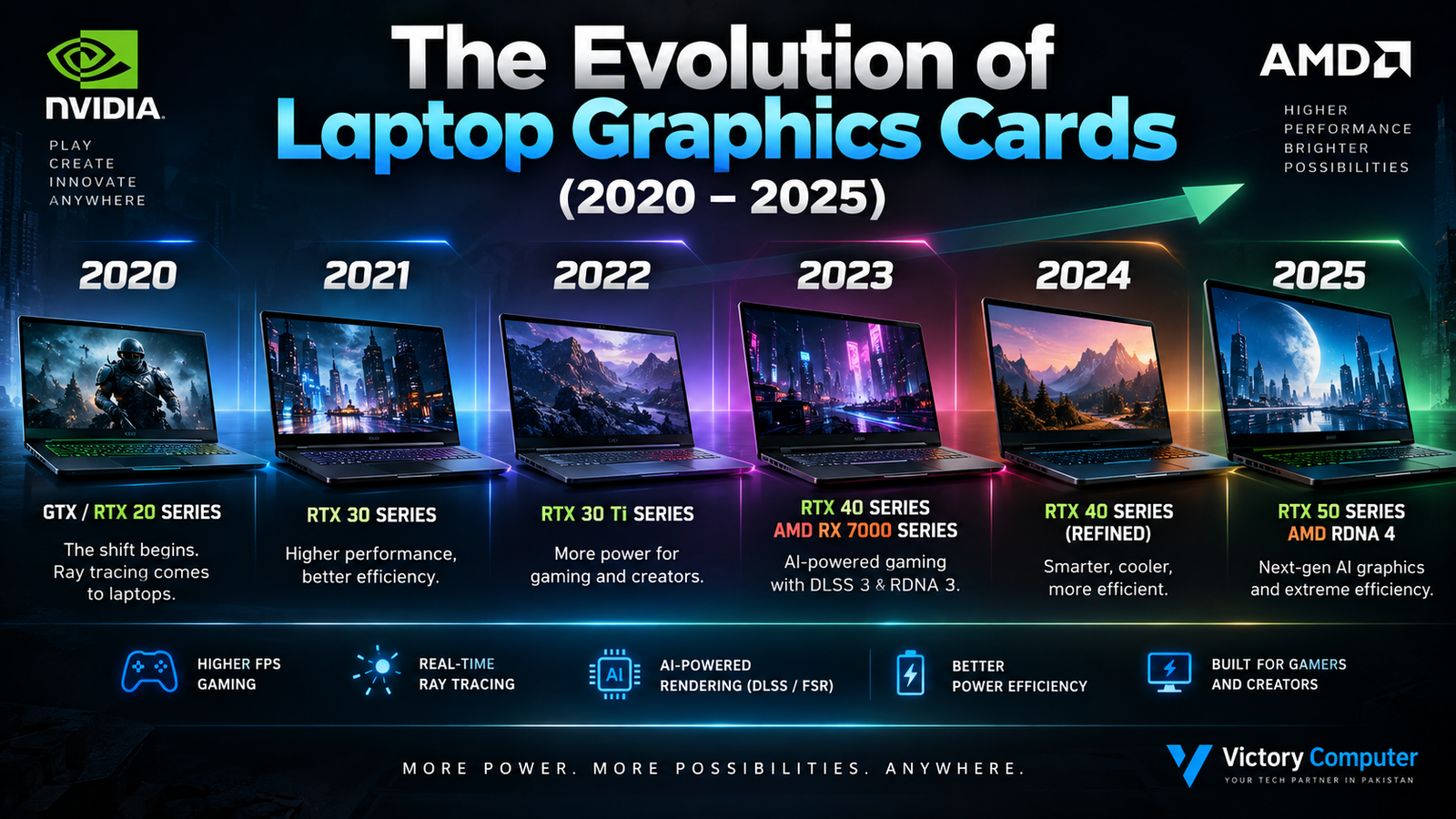
The Evolution of Laptop Graphics Cards
The evolution of laptop graphics cards between 2020 and 2025 transformed gaming laptops from compromised portable machines into much more capable systems for gaming, video editing, 3D rendering and AI-assisted workloads. The biggest advances came from real-time ray tracing, AI-based rendering technologies, better performance per watt and increasingly sophisticated power management.
Laptop GPU Evolution: 2020–2025
The biggest story between 2020 and 2025 was not simply higher graphics performance. Laptop GPUs became increasingly dependent on specialized ray-tracing hardware, AI acceleration, intelligent power management and upscaling/frame-generation technologies.
2020: RTX Features Become More Important
In 2020, NVIDIA’s Turing generation helped establish the distinction between traditional GTX gaming and the newer RTX approach. GeForce RTX 20 Series laptop GPUs incorporated dedicated hardware for real-time ray tracing and AI workloads, while DLSS demonstrated how AI-assisted rendering could improve performance.
GTX-based laptops remained useful for conventional gaming, but RTX established the direction that laptop graphics would follow over the next several generations.
2021: RTX 30 Series Brings Ampere to Laptops
The arrival of GeForce RTX 30 Series Laptop GPUs brought NVIDIA’s Ampere architecture into gaming notebooks. Improvements included newer RT and Tensor cores, while technologies such as Dynamic Boost 2.0 could dynamically balance power between major system components.
This period also showed why comparing laptop GPUs by model number alone can be misleading. Cooling design and configured GPU power can significantly influence the performance delivered by a gaming laptop.
2022: High-End Laptop GPUs Move Further Upmarket
By 2022, machines equipped with GPUs such as the RTX 3070 Ti and RTX 3080 Ti Laptop GPU demonstrated how far portable graphics had progressed. High-resolution gaming and demanding creator workloads became increasingly practical on premium gaming notebooks.
At the same time, higher performance continued to require capable cooling systems and substantial power budgets, creating an important trade-off between portability and sustained graphics performance.
2023: RTX 40 Series Introduces Ada and DLSS 3
2023 was another major stage in the evolution of laptop graphics cards. NVIDIA brought its Ada Lovelace architecture to laptops with the GeForce RTX 40 Series.
DLSS 3 added Frame Generation alongside Super Resolution and NVIDIA Reflex. This shifted part of the performance discussion away from raw rendering alone toward a combination of conventional GPU performance and AI-assisted graphics.
AMD also expanded its mobile graphics portfolio with Radeon RX 7000M and 7000S Series GPUs based on RDNA 3, targeting gaming performance and improved performance per watt.
2024: Efficiency and AI Features Become More Important
During 2024, RTX 40 Series gaming laptops matured across a broad range of designs. The market increasingly emphasized the complete laptop rather than only the GPU name: cooling, GPU power limits, CPU pairing, display resolution and memory configuration all affected the actual experience.
AI-assisted graphics technologies also became increasingly relevant. Features such as DLSS, frame generation and advanced upscaling allowed supported games to target higher frame rates without relying entirely on traditional native-resolution rendering.
2025: RTX 50 Series Brings Blackwell to Gaming Laptops
In 2025, NVIDIA introduced GeForce RTX 50 Series Laptop GPUs based on the Blackwell architecture. The generation expanded the role of AI and neural rendering in graphics and introduced DLSS 4 with Multi Frame Generation on supported hardware and games.
The move from RTX 20 Series to RTX 50 Series illustrates a fundamental change in laptop graphics: modern GPU performance is increasingly shaped by dedicated ray-tracing hardware, Tensor/AI processing, software features and power efficiency alongside conventional rasterization performance.
What Changed the Most in Laptop Graphics Cards?
1. Ray Tracing Became a Standard High-End Feature
Early RTX laptops introduced dedicated ray-tracing hardware, and later generations continued improving that capability. Ray tracing can produce more realistic lighting, reflections and shadows in supported games, although enabling demanding effects can still reduce native rendering performance.
2. AI-Assisted Rendering Changed Performance
DLSS became increasingly important across successive RTX generations. Rather than relying only on rendering every output pixel conventionally, supported DLSS modes can use AI techniques for image reconstruction and, on compatible generations, frame generation.
This is especially significant for laptops because power and thermal limits are more restrictive than on large desktop systems.
3. Performance per Watt Improved
Laptop manufacturers must balance performance against heat, fan noise, chassis thickness and battery capacity. Modern GPU architectures and platform-level power management have therefore focused heavily on efficiency rather than simply increasing power consumption.
4. GPUs Became More Important for Creators
Modern discrete laptop GPUs are useful beyond gaming. GPU acceleration can help with compatible video-editing, 3D, rendering and AI applications. Buyers working with demanding creative software should therefore consider GPU capability alongside CPU performance, RAM and storage.
For more creator-focused buying guidance, see Victory Computer’s guide to laptops for video editing in Pakistan.
Laptop GPU Generation Comparison
| Period | Major Laptop GPU Development | Main Change |
|---|---|---|
| 2020 | RTX 20 Series / GTX 16 Series | RTX ray tracing and AI-assisted DLSS gain importance |
| 2021 | RTX 30 Series | Ampere architecture and improved power-management technologies |
| 2022 | RTX 30 Ti laptop models | Higher-end mobile gaming and creator performance |
| 2023 | RTX 40 Series / Radeon RX 7000 Series | Ada Lovelace, DLSS 3 and AMD RDNA 3 laptop graphics |
| 2024 | Mature RTX 40 / Radeon RX 7000 laptops | Greater focus on efficiency, AI features and complete system design |
| 2025 | RTX 50 Series | Blackwell architecture, neural rendering and DLSS 4 features |
Pros and Cons of Modern Laptop Graphics Cards
Pros
- Strong portable performance: Modern gaming laptops can handle demanding games, creative applications and GPU-accelerated workloads without requiring a desktop PC.
- Ray-tracing hardware: RTX and modern Radeon GPUs provide dedicated hardware for advanced lighting and visual effects.
- AI-assisted performance: Technologies such as DLSS can improve performance in supported games, with newer generations adding more advanced frame-generation capabilities.
- Better efficiency: New architectures and intelligent power-management technologies allow manufacturers to deliver substantial graphics capability within laptop power and thermal limits.
- Creator acceleration: Discrete GPUs can accelerate compatible video editing, rendering, 3D and AI workflows.
Cons
- Performance varies between laptops: Two notebooks using similarly named GPUs can perform differently because of GPU power configuration, cooling and overall system design.
- Higher-performance models generate more heat: Powerful GPUs still require effective cooling and can produce noticeable fan noise under sustained workloads.
- Limited GPU upgradeability: Unlike a typical desktop graphics card, the dedicated GPU in most laptops cannot simply be replaced with a newer model.
- Premium GPUs increase laptop cost: Moving to higher GPU tiers can substantially increase the total price of the notebook.
Why We Recommend Modern Dedicated GPUs
A modern dedicated laptop GPU makes sense for buyers who regularly play demanding games, edit high-resolution video, work with 3D applications or use GPU-accelerated creative software. Buyers focused mainly on web browsing, Microsoft Office, classes and basic business applications may not need the additional cost, heat and power requirements of a high-end discrete GPU.
Which Laptop GPU Should You Choose?
Do not choose a gaming laptop solely because it has the newest GPU generation. Start with the applications and games you actually intend to use, then consider display resolution, GPU class, VRAM, cooling design and the laptop’s configured graphics power.
For mainstream gaming, a well-balanced mid-range GPU can provide better value than paying significantly more for a flagship model. Competitive gamers should also consider display refresh rate, while video editors and 3D creators should check the GPU requirements of their specific software.
Buyers comparing current machines can browse gaming laptops in Pakistan. Readers considering desktop graphics hardware can also review the graphics cards price guide for Pakistan.
Frequently Asked Questions
Why are RTX laptop GPUs different from older GTX GPUs?
RTX GPUs include dedicated hardware designed for ray tracing and AI processing. This enables technologies such as hardware-accelerated ray tracing and NVIDIA DLSS that are not available in the same way on GTX GPUs.
Can a gaming laptop replace a gaming desktop?
For many users, yes. Modern gaming laptops can provide strong gaming and creator performance, but desktops generally offer easier component upgrades, greater cooling capacity and more flexibility in power consumption.
Does the same laptop GPU perform equally in every laptop?
No. Cooling, configured GPU power, CPU pairing and chassis design can affect sustained performance, so the GPU model name should not be the only comparison point.
Are newer laptop GPUs more power efficient?
Efficiency has been a major focus of recent GPU generations. However, actual battery life and power consumption depend on the complete laptop configuration and workload, not the GPU architecture alone.
Is an RTX 50 Series laptop automatically better than an RTX 40 Series laptop?
No. GPU tier, configured power, cooling, display, CPU, RAM and price all matter. A well-configured higher-tier RTX 40 Series laptop can still be more suitable than a lower-tier newer-generation model for some workloads.
Where can I compare gaming laptops in Pakistan?
You can browse current gaming laptops in Pakistan or visit Victory Computer to compare available laptop categories and configurations.

About Victory Computer Editorial Team
Victory Computer Editorial Team The Victory Computer Editorial Team publishes informative, research-based content about laptops, computers, monitors, printers, hardware, and technology trends in Pakistan. Our goal is to help readers understand product specifications, compare available options, and make informed purchasing decisions.
View all posts by Victory Computer Editorial Team