
AI-enhanced video and audio content editing on Mac

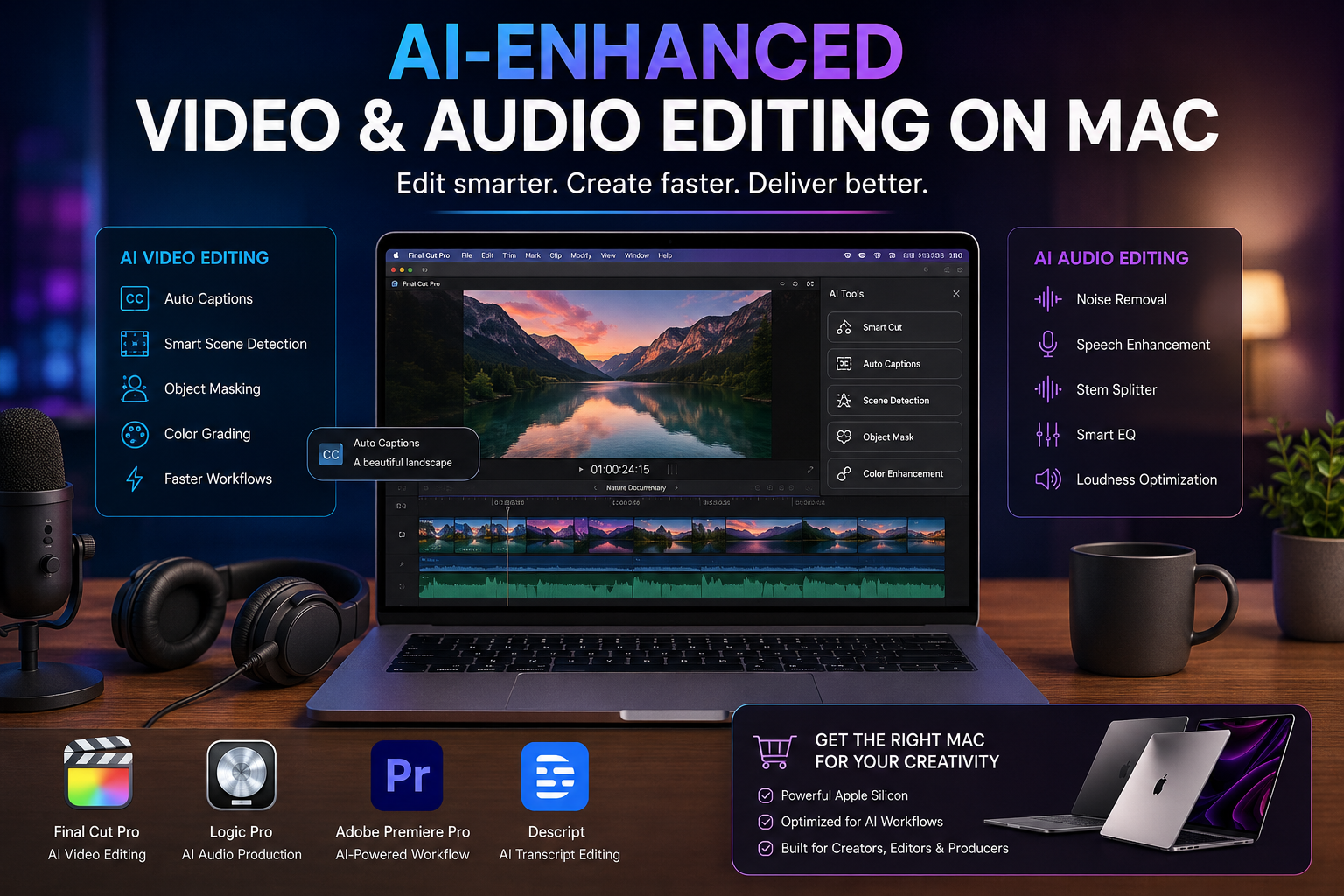
AI-Enhanced Video and Audio Content Editing on Mac
AI video and audio editing on Mac can reduce repetitive production work by automating tasks such as captions, object masking, footage search, dialogue cleanup and transcript-based editing. Final Cut Pro, Logic Pro, Adobe Premiere and Descript now combine AI-assisted tools with conventional editing controls, allowing creators to work faster without giving up manual creative control.
How Is AI Changing Video and Audio Editing on Mac?
AI is most useful when it handles repetitive editing rather than trying to replace the editor. Tasks that previously required manual transcription, frame-by-frame masking, searching through large media libraries or repeated audio cleanup can increasingly be assisted by software.
For YouTubers, podcasters, filmmakers, social-media creators and students, this can mean less time spent on routine production tasks and more time making decisions about pacing, storytelling, sound and visual style.
- Automatic captions: Turn spoken dialogue into subtitles.
- Object masking: Isolate people or objects with less manual tracking.
- Audio cleanup: Improve dialogue clarity and reduce distracting noise.
- Footage search: Find shots using visual, transcript and metadata information.
- Transcript editing: Edit spoken content through its text transcript.
- Stem separation: Separate parts of an existing audio recording for further mixing.
Final Cut Pro AI Features for Video Editors
Final Cut Pro has become an important option for AI video editing on Mac because Apple is integrating intelligent features directly into the editing workflow.
Current Final Cut Pro tools include Generate Captions, Edit Detection and Auto Mask. Generate Captions can transcribe audio and place subtitles in the timeline, while Edit Detection can analyze an already-rendered video and identify edit points. Auto Mask can isolate recognized objects, reducing the amount of manual masking required in suitable projects.
Apple also documents machine-learning-assisted masking that tracks selected people, objects or shapes through frames. These tools are especially useful for interviews, YouTube videos, social clips and projects that require frequent captioning or selective visual adjustments.
Logic Pro Brings AI Into Audio Production
AI audio editing on Mac extends beyond noise removal. Logic Pro includes intelligent production features designed for musicians, producers, podcasters and other audio creators.
Apple’s Stem Splitter can separate a mixed recording into components such as vocals, drums, bass, guitar and piano. This gives creators more control when remixing or processing material. Mastering Assistant analyzes a mix and provides an adjustable starting point for mastering.
These features do not remove the need for critical listening. EQ decisions, dynamics, arrangement and final mastering choices still benefit from human judgment, but AI-assisted processing can shorten several technical stages of the workflow.
Adobe Premiere Adds Generative and Search-Based AI
Adobe Premiere provides another approach to AI video and audio editing on Mac. Adobe has integrated Firefly-powered generative tools alongside AI-assisted search, captions and audio processing.
Generative Extend can create additional frames or audio when an editor needs extra material around an edit. Media Intelligence helps editors search footage using visual information, transcripts and metadata instead of manually reviewing every clip.
Premiere also includes Enhance Speech, an AI-powered feature designed to improve dialogue clarity and reduce distracting background noise. For creators already using Adobe applications, these capabilities can fit naturally into an existing Creative Cloud workflow.
AI-generated material should still be reviewed carefully. Continuity, factual accuracy, visual artifacts and creative appropriateness remain the editor’s responsibility.
Descript Makes Editing More Like Editing a Document
Descript takes a different approach to AI editing. Instead of making the timeline the center of every task, Descript allows creators to edit video and audio through a transcript.
Its Underlord AI assistant can work with transcript-based instructions and help with tasks such as removing filler words, selecting clips and performing repetitive edits. Text-based editing is particularly useful for podcasts, interviews, educational videos, talking-head content and other speech-heavy projects.
Traditional timeline software remains preferable for many complex visual edits, but transcript-first editing can substantially simplify dialogue-heavy productions.
AI Editing on Mac vs Traditional Editing
| Task | AI-Assisted Workflow | Traditional Workflow |
|---|---|---|
| Captions | Automatic transcription and caption generation | Manual transcription and timing |
| Object isolation | AI-assisted masking and tracking | Manual masks and tracking |
| Footage search | Content, transcript and metadata search | Manual clip review and organization |
| Dialogue cleanup | AI-assisted speech enhancement | Manual EQ, noise reduction and processing |
| Podcast editing | Transcript-based editing | Waveform and timeline editing |
| Creative decisions | Still requires human review | Controlled directly by the editor |
MacBook Air or MacBook Pro for AI Editing?
The right Mac depends more on workload than on the presence of AI features. A MacBook Air can make sense for lighter video projects, podcast production, short-form content, basic photo work and creators who prioritize portability.
A MacBook Pro is generally the more appropriate direction for demanding professional workloads involving longer timelines, higher-resolution media, complex effects, heavier multitasking or sustained rendering. Buyers comparing other systems can also review Victory Computer’s professional editing laptops in Pakistan before deciding between macOS and Windows hardware.
Memory and storage should also be considered before purchase because professional video libraries, cache files and source footage can consume substantial storage. Choose the configuration around the projects you actually expect to edit rather than buying solely because a machine is marketed for AI.
Advantages and Limitations of AI Editing on Mac
Pros
- Reduces repetitive editing work.
- Speeds up captioning and transcription.
- Can simplify masking and footage discovery.
- Provides useful audio-cleanup and production tools.
- Works within established applications such as Final Cut Pro, Logic Pro and Premiere.
Cons
- AI-generated edits still require human review.
- Some features require specific hardware, software versions or internet connectivity.
- Automated masking, transcription and generative results can make mistakes.
- Professional projects still require editing, storytelling and audio expertise.
Why We Recommend It
AI-assisted editing is most valuable for creators who treat automation as a production tool rather than a replacement for creative judgment. Editors working with frequent captions, interviews, podcasts, social clips or large media libraries are likely to notice the greatest workflow benefits.
Buying a Mac for Content Creation in Pakistan
Creators buying a Mac in Pakistan should verify the exact model, memory, storage, warranty terms and seller information before ordering. Avoid choosing a system based only on an “AI laptop” label because different editing applications place different demands on memory, storage and sustained performance.
MacBooks themselves generally should not be described as “PTA-approved” laptops. PTA device registration primarily concerns devices using cellular network identification, so that wording should not be used as a general quality or authenticity claim for a standard MacBook.
If you are considering an older machine, a used MacBook Pro buying guide can help identify important checks before purchase. Buyers comparing lighter systems can similarly research MacBook Air options before deciding.
Victory Computer in Lahore provides computers and laptops for customers across Pakistan. Before purchasing, confirm the current product listing, configuration, availability and applicable warranty terms rather than assuming that every model carries identical coverage.
Frequently Asked Questions
Is Mac good for AI video editing?
Yes. Mac supports major editing platforms including Final Cut Pro, Adobe Premiere and Descript, while Apple silicon also powers machine-learning features inside Apple’s creative applications.
Does Final Cut Pro use AI?
Yes. Current Final Cut Pro versions include intelligent features such as Generate Captions, Edit Detection and AI-assisted masking tools.
Can AI edit audio on a Mac?
Yes. Logic Pro, Adobe Premiere and Descript provide AI-assisted tools for tasks including stem separation, speech enhancement, transcript editing and repetitive audio cleanup.
Is MacBook Air enough for video editing?
A MacBook Air can suit lighter editing, short-form content and many everyday creator workflows. More demanding sustained workloads may justify a MacBook Pro or another higher-performance editing laptop.
Can AI completely replace a video editor?
No. AI can automate technical and repetitive tasks, but pacing, storytelling, accuracy, style and final quality still require human decisions.
Where can I buy a Mac or editing laptop in Pakistan?
Victory Computer offers computers and laptops through its Lahore-based business and online store. Check the current product page for exact configuration, price, availability and warranty information before ordering.
Final Recommendation
AI video and audio editing on Mac is most useful when it removes repetitive work while leaving creative decisions with the editor. Final Cut Pro is particularly attractive for creators who want an Apple-focused video workflow, Logic Pro provides intelligent music and audio tools, Premiere offers a broad AI-assisted professional workflow, and Descript is especially useful for transcript-heavy video and podcast production.
Choose your Mac according to workload, memory and storage requirements—not simply because a model supports AI. For buyers in Pakistan, compare the currently available laptops and configurations from Victory Computer before selecting a system for your editing workflow.
Lorem ipsum dolor sit amet, consectetur adipiscing elit. Ut elit tellus, luctus nec ullamcorper mattis, pulvinar dapibus leo.

About Victory Computer Editorial Team
Victory Computer Editorial Team The Victory Computer Editorial Team publishes informative, research-based content about laptops, computers, monitors, printers, hardware, and technology trends in Pakistan. Our goal is to help readers understand product specifications, compare available options, and make informed purchasing decisions.
View all posts by Victory Computer Editorial Team