
Corsair iCUE Titan 280 RX RGB Cooler | Expert review

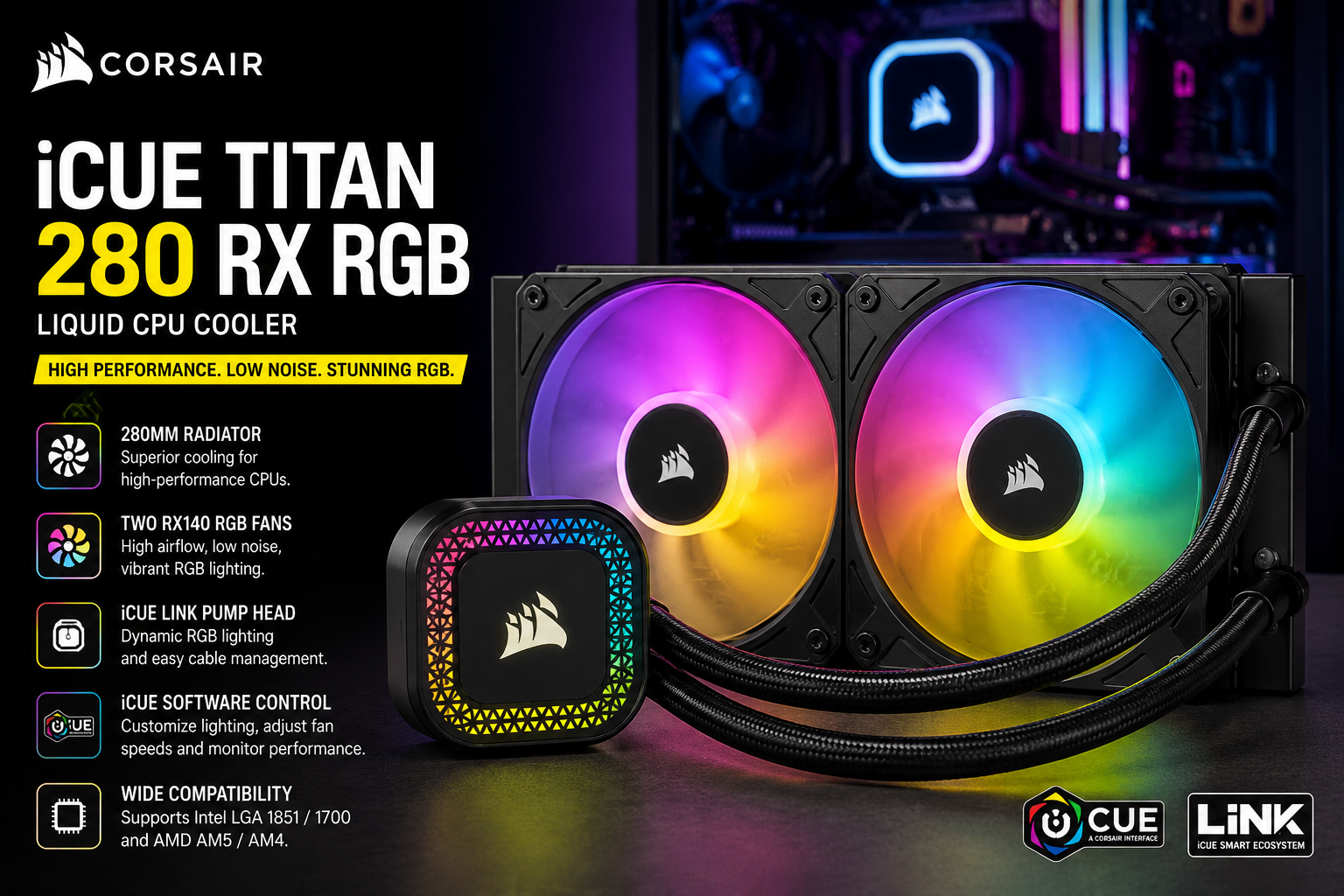
Corsair iCUE Titan 280 RX RGB Cooler
The Corsair iCUE Titan 280 RX RGB Cooler is a premium 280mm all-in-one liquid CPU cooler designed for powerful gaming PCs and performance-focused desktop builds. It combines a 280mm radiator, two RX140 RGB fans, Corsair’s FlowDrive cooling engine, extensive RGB lighting and iCUE LINK control. Its biggest strengths are cooling-focused hardware and cable management, while the main considerations are case compatibility and the investment required for a premium AIO.
1. Corsair iCUE Titan 280 RX RGB Cooler Overview
The Corsair iCUE Titan 280 RX RGB sits between compact 240mm AIO coolers and larger 360mm solutions. Its 280mm radiator uses two 140mm fans, making it particularly attractive for builders who want substantial radiator surface area without installing a three-fan 360mm cooler.
Corsair equips the cooler with its FlowDrive cooling engine, a copper cold plate and an aluminum radiator. The cooler is also part of the iCUE LINK ecosystem, allowing compatible components to connect through Corsair’s streamlined digital system.
2. 280mm Radiator and Cooling Design
The cooler uses a 280mm-class radiator measuring 317mm × 140mm × 27mm. The larger 140mm width is an important consideration because buyers must confirm that their PC case supports a 280mm radiator before ordering.
The copper cold plate transfers heat from the CPU into the liquid-cooling loop, while the aluminum radiator dissipates that heat through airflow generated by the two included fans.
For gaming systems, workstation builds and high-performance CPUs, this configuration provides the type of cooling capacity expected from a premium 280mm AIO without requiring the three-fan layout of a 360mm model.
3. Two RX140 RGB Fans
Corsair includes two iCUE LINK RX140 RGB fans. Each fan measures 140mm × 25mm and operates between approximately 300 and 1,700 RPM ±10%.
- Two 140mm RX140 RGB fans are included.
- Fan airflow is rated from 17.9 to 94.7 CFM per fan.
- Static pressure is rated from 0.15 to 3.75 mm-H2O.
- Rated fan noise ranges from 10 to 36 dBA.
- Magnetic Dome bearings are used in the RX140 RGB fans.
The combination of airflow and static pressure is particularly relevant for radiator cooling because the fans need to move air effectively through the radiator fins rather than simply circulate air inside the case.
4. FlowDrive Cooling Engine
One of the key upgrades in the TITAN RX RGB family is Corsair’s FlowDrive cooling engine. Corsair uses a three-phase motor in the pump together with a precision-engineered cold plate designed to improve contact with the CPU’s integrated heat spreader.
For buyers, the practical point is simple: the TITAN 280 RX RGB is designed as a performance-oriented AIO rather than an RGB cooler where appearance takes priority over the cooling hardware.
5. iCUE LINK Makes Cable Management Easier
The iCUE LINK ecosystem is one of the biggest reasons to consider the Corsair iCUE Titan 280 RX RGB Cooler. Compatible iCUE LINK components can connect together through Corsair’s universal connector system, reducing the number of individual cables that need to be routed around a PC build.
This can be especially useful in RGB-heavy gaming systems containing multiple fans and other Corsair components. Users can manage compatible lighting and performance settings through Corsair iCUE software.
6. RGB Lighting
The TITAN 280 RX RGB is designed for users who want cooling hardware to form part of the visual design of their PC. Corsair specifies 20 RGB LEDs on the pump, while each RX140 RGB fan contains eight individually addressable RGB LEDs.
Lighting can be coordinated through iCUE software with other compatible Corsair hardware, making the cooler particularly suitable for builds already using the Corsair ecosystem.
7. CPU Socket Compatibility
The Corsair iCUE Titan 280 RX RGB Cooler supports current mainstream Intel and AMD desktop platforms, including:
- Intel LGA 1851
- Intel LGA 1700
- AMD AM5
- AMD AM4
This covers many current and recent Intel Core and AMD Ryzen desktop platforms. Buyers using an older socket should verify compatibility before purchasing rather than assuming universal support.
8. Case Compatibility Matters
A 280mm AIO should never be purchased without checking the PC case first. The radiator itself measures approximately 317mm long and 140mm wide, and additional clearance is required for the fans and surrounding components.
Check your case specifications for 280mm radiator support at the intended top, front or side mounting location. Also consider motherboard heatsinks, RAM clearance and GPU positioning when planning the installation.
9. Corsair iCUE Titan 280 RX RGB Cooler Pros and Cons
Pros
- 280mm radiator: Provides substantial cooling surface area while using a two-fan configuration.
- Two RX140 RGB fans: High-airflow 140mm fans are specifically suited to radiator use.
- FlowDrive cooling engine: Three-phase pump motor and redesigned cold plate are central to Corsair’s cooling design.
- Excellent RGB customization: Pump and fan lighting can be controlled through Corsair iCUE.
- iCUE LINK connectivity: Simplifies connections in compatible Corsair builds.
- Modern socket support: Compatible with Intel LGA 1851/1700 and AMD AM5/AM4.
Cons
- Case compatibility: Not every PC case supports a 280mm radiator.
- Premium positioning: Budget PC builders may not need the extra ecosystem and RGB features.
- Best suited to the Corsair ecosystem: Some of its strongest convenience features become more valuable when paired with other iCUE LINK components.
- No built-in LCD: Buyers wanting an integrated screen should consider an LCD-equipped alternative rather than choosing this model purely for RGB.
10. Who Should Buy the Corsair iCUE Titan 280 RX RGB?
The Corsair iCUE Titan 280 RX RGB Cooler makes the most sense for several types of PC builders:
- Gamers building a high-performance desktop PC.
- Users running performance-oriented Intel Core or AMD Ryzen processors.
- Content creators with sustained CPU workloads.
- PC enthusiasts who want coordinated RGB lighting.
- Builders already using Corsair iCUE LINK hardware.
- Users who want a two-fan AIO but have room for 140mm radiator fans.
For a basic office PC or low-power processor, a premium 280mm liquid cooler may be unnecessary. In those situations, a simpler air cooler or smaller AIO can offer better value.
11. Corsair Titan 280 RX RGB vs 240mm AIO
| Feature | TITAN 280 RX RGB | Typical 240mm AIO |
|---|---|---|
| Radiator Class | 280mm | 240mm |
| Fan Size | 2 × 140mm | 2 × 120mm |
| Case Compatibility | More clearance required | Generally easier to fit |
| Best For | Performance-oriented builds | Compact or mainstream builds |
The 280mm format is attractive when your case supports it and you want larger 140mm radiator fans. A 240mm AIO remains the more practical choice when case compatibility or overall build size is the priority.
12. Is the Corsair iCUE Titan 280 RX RGB Worth It?
Yes, for the right PC build. The Corsair iCUE Titan 280 RX RGB Cooler combines a large 280mm radiator, two RX140 RGB fans, a modern FlowDrive pump design and iCUE LINK connectivity in one package.
The strongest reason to choose it is not RGB alone. The cooler makes the most sense when you want a performance-focused AIO and can also benefit from Corsair’s integrated lighting and connectivity ecosystem.
For a budget build, a simpler cooler is likely more sensible. For a high-performance gaming or creator PC with sufficient 280mm radiator clearance, the TITAN 280 RX RGB is a much more logical fit.
13. Where to Buy Corsair iCUE Titan 280 RX RGB Cooler in Pakistan
Buyers in Pakistan should compare current availability, warranty terms and pricing before ordering the Corsair iCUE Titan 280 RX RGB Cooler. Victory Computer supplies computer hardware and gaming components in Pakistan, with support available from its Lahore operation.
Because PC component pricing and stock can change, confirm the current price and availability directly with Victory Computer before purchasing.
Victory Computer WhatsApp: 0300 9466881
14. Why We Recommend It
The Corsair iCUE Titan 280 RX RGB Cooler is a strong choice for builders who specifically want 280mm liquid cooling, 140mm RGB fans and iCUE LINK integration. Its combination of cooling-focused hardware and simplified connectivity makes the most sense in premium gaming and enthusiast PCs.
Choose a smaller or less expensive cooler if you are building a budget system, have limited radiator clearance, or do not need Corsair’s RGB and iCUE LINK ecosystem.
Frequently Asked Questions
What size radiator does the Corsair iCUE Titan 280 RX RGB use?
It uses a 280mm-class aluminum radiator measuring approximately 317mm × 140mm × 27mm.
How many fans come with the Corsair Titan 280 RX RGB?
The cooler includes two Corsair iCUE LINK RX140 RGB fans measuring 140mm × 25mm each.
What is the fan speed of the RX140 RGB fans?
Corsair specifies an operating range of approximately 300 to 1,700 RPM ±10%.
Does the Corsair Titan 280 RX RGB support AM5?
Yes. The cooler officially supports AMD AM5 and AM4 sockets.
Does it support Intel LGA 1851?
Yes. Official socket compatibility includes Intel LGA 1851 and LGA 1700.
Can the RGB lighting be customized?
Yes. The cooler supports customizable RGB lighting through Corsair iCUE, including lighting on the pump and RX140 RGB fans.
Final Word
The Corsair iCUE Titan 280 RX RGB Cooler is designed for PC enthusiasts who want strong 280mm AIO hardware without giving up RGB customization or clean system integration. Two RX140 RGB fans, the FlowDrive cooling engine, a copper cold plate and iCUE LINK connectivity give the cooler a well-rounded feature set for modern gaming and performance PCs.
The most important step before buying is checking 280mm radiator compatibility with your PC case. If your case supports it and your build can benefit from premium liquid cooling and Corsair’s ecosystem, the TITAN 280 RX RGB deserves serious consideration.

About Victory Computer Editorial Team
Victory Computer Editorial Team The Victory Computer Editorial Team publishes informative, research-based content about laptops, computers, monitors, printers, hardware, and technology trends in Pakistan. Our goal is to help readers understand product specifications, compare available options, and make informed purchasing decisions.
View all posts by Victory Computer Editorial Team
2 thoughts on “Corsair iCUE Titan 280 RX RGB Cooler | Expert review”