
Corsair iCUE 360 RGB Cooler | Expert review

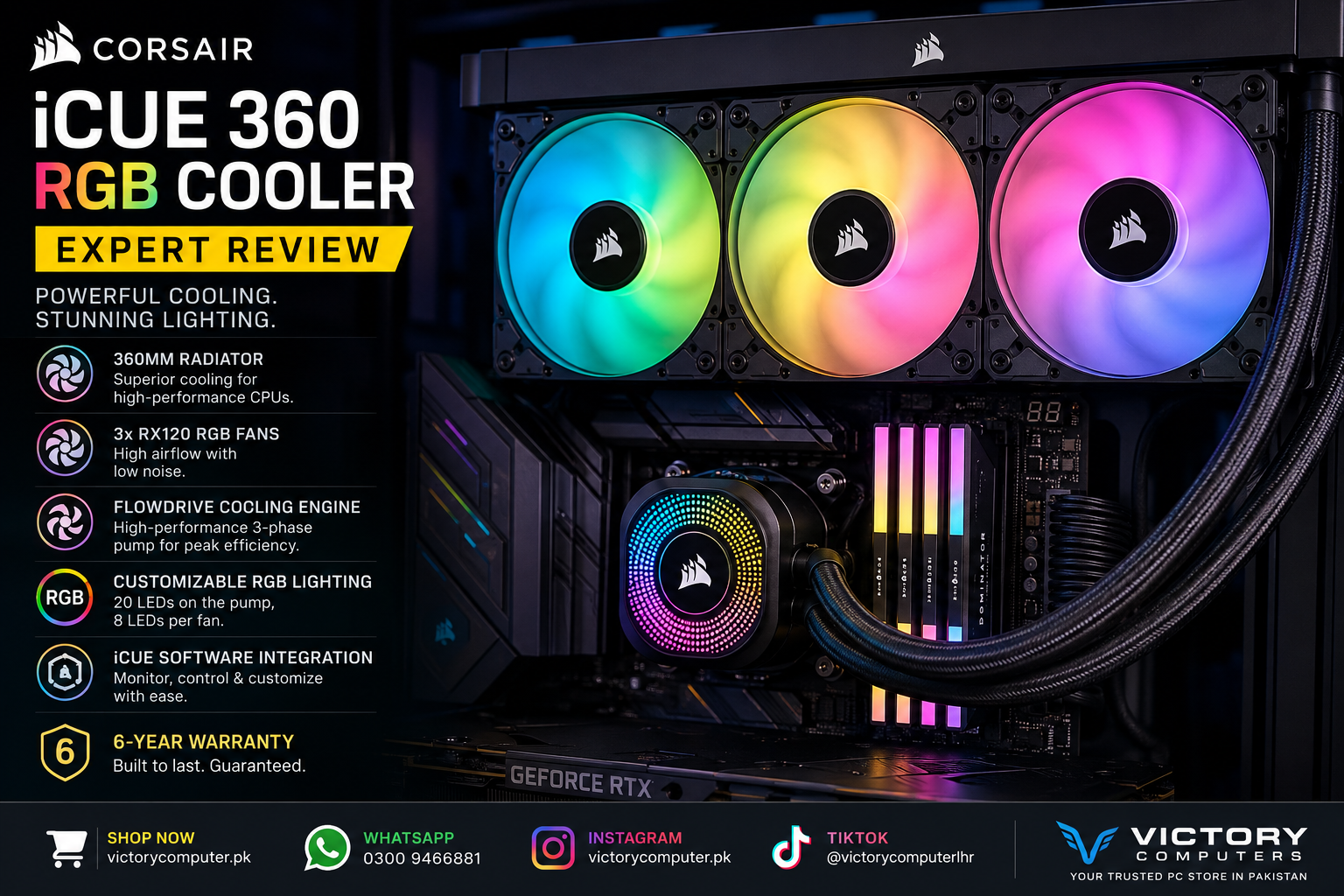
Corsair iCUE 360 RGB Cooler
The Corsair iCUE 360 RGB Cooler is a premium 360mm liquid CPU cooling solution designed for powerful gaming PCs, content-creation systems, and performance-focused builds. With a large radiator, three RX120 RGB fans, FlowDrive cooling technology, extensive RGB lighting, and iCUE LINK integration, it combines serious cooling potential with a clean gaming aesthetic.
In this expert review, we examine its cooling design, fan performance, RGB features, compatibility, advantages, disadvantages, and whether a 360mm AIO cooler makes sense for your next PC build.
Corsair iCUE 360 RGB Cooler Overview
The model covered in this review is the CORSAIR iCUE LINK TITAN 360 RX RGB AIO Liquid CPU Cooler. It uses a 360mm-class radiator with three 120mm RX RGB fans and CORSAIR’s FlowDrive cooling engine.
The combination is aimed primarily at systems where sustained CPU cooling matters. This includes high-performance gaming PCs, editing workstations, streaming setups, rendering systems, and enthusiast builds.
Unlike a basic air cooler, the Corsair iCUE 360 RGB Cooler also places significant emphasis on appearance and system integration. Its pump and fans feature individually addressable RGB lighting, while iCUE LINK provides centralized control for compatible CORSAIR components.
360mm Cooling Performance for High-End CPUs
One of the biggest reasons to choose the Corsair iCUE 360 RGB Cooler is its large radiator. The official radiator dimensions are approximately 396mm × 120mm × 27mm, providing a substantial surface area for heat dissipation.
A larger radiator does not automatically guarantee lower CPU temperatures in every system because results also depend on the processor, case airflow, ambient temperature, fan profile, power limits, thermal paste, and installation. However, a 360mm AIO provides considerably more cooling surface area than smaller liquid cooling configurations.
This makes the cooler particularly attractive for users building systems around performance-oriented processors that can generate substantial heat during gaming, rendering, video editing, compilation, and other sustained workloads.
Three RX120 RGB Fans Deliver Strong Airflow
The radiator is paired with three 120mm RX120 RGB fans. According to CORSAIR’s specifications, the fans operate between approximately 300 and 2100 RPM ±10%.
Official airflow is rated from 10.4 to 73.5 CFM, while static pressure reaches up to 4.33 mm-H2O. Static pressure is particularly relevant for radiator cooling because the fans need to move air effectively through the radiator fins rather than simply circulate unrestricted air inside the case.
The wide fan-speed range also gives users flexibility. Lower speeds can be useful when prioritizing quieter everyday operation, while higher speeds provide additional airflow when the CPU is placed under a heavy workload.
FlowDrive Cooling Engine Improves the Cooling Design
A major feature of the TITAN RX RGB platform is CORSAIR’s FlowDrive cooling engine. The pump uses a three-phase motor and works with a precision-engineered cold plate designed to provide effective contact with the CPU’s integrated heat spreader.
The cold plate itself is made from copper, a material commonly used in performance CPU cooling because of its thermal conductivity.
For demanding processors, the combination of a large radiator, copper cold plate, dedicated pump, and three radiator fans provides a more performance-oriented thermal solution than entry-level CPU cooling options.
RGB Lighting Is One of Its Strongest Visual Features
Cooling is only part of the appeal. The Corsair iCUE 360 RGB Cooler is designed for users who want their PC to look as impressive as it performs.
The pump incorporates 20 individually addressable RGB LEDs, while each RX RGB fan contains eight individually addressable RGB LEDs. With three fans, users have extensive lighting coverage across both the radiator and pump area.
Lighting effects can be coordinated through CORSAIR iCUE, making the cooler particularly suitable for gaming PCs using additional compatible RGB components.
Users who prefer a minimalist workstation without visible lighting may not benefit as much from this feature, but for tempered-glass gaming builds, RGB customization is a major advantage.
iCUE LINK Makes System Control More Convenient
The iCUE LINK ecosystem is another important part of this cooler. Compatible components can be managed through CORSAIR’s software ecosystem, helping users control lighting and monitor their setup from one interface.
This can be particularly useful in builds containing several compatible CORSAIR components because it reduces the need to manage every RGB device independently.
There is a trade-off, however. Buyers who prefer a completely software-independent build may find an ecosystem-focused cooler less attractive than a simpler AIO.
CapSwap Adds Extra Customization
CORSAIR also supports its CapSwap modular design on the TITAN RX RGB. The default pump cap can be replaced with compatible CapSwap modules without tools.
This allows users to modify the appearance or functionality of the pump area later rather than replacing the complete cooler. Compatible optional modules are sold separately, so they should be considered an upgrade rather than a standard included feature.
Intel and AMD CPU Compatibility
The Corsair iCUE 360 RGB Cooler supports current mainstream Intel and AMD desktop platforms. Official socket compatibility includes:
- Intel LGA 1851
- Intel LGA 1700
- AMD AM5
- AMD AM4
This makes the cooler suitable for a broad range of modern Intel Core and AMD Ryzen desktop builds.
Before purchasing, users should still verify both CPU socket compatibility and case radiator clearance. CPU compatibility alone does not mean the cooler will physically fit every PC case.
Corsair iCUE 360 RGB Cooler Pros and Cons
Pros
- Large 360mm radiator: Provides substantial cooling surface area for performance-oriented CPUs.
- Three RX120 RGB fans: Offers strong radiator airflow with fan speeds reaching approximately 2100 RPM.
- FlowDrive cooling engine: Uses a three-phase pump motor and copper cold plate.
- Excellent RGB customization: Includes 20 addressable LEDs around the pump and eight LEDs on each fan.
- Modern CPU compatibility: Supports Intel LGA 1851/1700 and AMD AM5/AM4.
- iCUE LINK integration: Useful for users building a coordinated CORSAIR gaming setup.
- Six-year cooling warranty: CORSAIR lists a six-year warranty for this cooler.
Cons
- Requires considerable case space: Your PC case must support a 360mm radiator and provide sufficient clearance.
- Potentially unnecessary for lower-power CPUs: Budget and mainstream processors may not require a large 360mm AIO.
- Software ecosystem: Getting the most from lighting and system integration means using the CORSAIR iCUE ecosystem.
- Optional CapSwap accessories cost extra: Additional pump-cap customization modules are sold separately.
Why We Recommend the Corsair iCUE 360 RGB Cooler
We recommend the Corsair iCUE 360 RGB Cooler primarily for high-performance gaming and workstation builds where both thermal capability and appearance are priorities.
The 360mm radiator, three RX120 fans, FlowDrive cooling engine, modern socket support, extensive RGB lighting, and iCUE LINK ecosystem create a well-rounded package for enthusiast PC builders. Its biggest limitation is practical rather than technical: you need a case large enough to install it properly.
Is the Corsair iCUE 360 RGB Cooler Good for Gaming?
Yes, it can be an excellent cooling option for a high-performance gaming PC, particularly when paired with a processor that operates at higher power levels or when the same system is used for gaming, streaming, editing, and other demanding workloads.
However, buyers should avoid choosing a 360mm AIO purely because it looks powerful. A mid-range processor may work perfectly well with a smaller AIO or quality air cooler. The best choice depends on the CPU, case, expected workload, noise preferences, and overall PC budget.
Who Should Buy the Corsair iCUE 360 RGB Cooler?
This cooler makes the most sense for:
- High-performance gaming PC builders
- Users running demanding Intel Core or AMD Ryzen processors
- Video editors and content creators
- 3D rendering and workstation users
- Streamers running CPU-intensive applications
- Enthusiasts building RGB gaming PCs
- Users already invested in the CORSAIR iCUE ecosystem
For an entry-level office computer or a low-power gaming system, a 360mm liquid cooler may provide more cooling capacity than necessary.
Corsair iCUE 360 RGB Cooler in Pakistan
For buyers in Pakistan, the most important checks before ordering are case compatibility, CPU socket support, current availability, and current price.
The Corsair iCUE 360 RGB Cooler can be considered for premium gaming PCs and custom desktop builds where a 360mm radiator is supported. Buyers should confirm current local pricing and availability before making a purchasing decision because computer hardware prices and stock can change.
Victory Computer provides PC components, laptops, gaming hardware, and computer accessories for customers in Pakistan. For current product information, customers can check the Victory Computer store or contact the sales team on WhatsApp: 0300 9466881.
Frequently Asked Questions
Is the Corsair iCUE 360 RGB Cooler good for gaming PCs?
Yes. Its 360mm radiator, three RX120 RGB fans, and FlowDrive cooling system make it particularly suitable for performance-focused gaming PCs using compatible CPUs and cases.
How many fans does the Corsair iCUE 360 RGB Cooler have?
The TITAN 360 RX RGB configuration includes three 120mm RX120 RGB fans.
What is the maximum fan speed?
CORSAIR specifies a fan-speed range of approximately 300 to 2100 RPM ±10%.
Does the Corsair iCUE 360 RGB Cooler support AMD AM5?
Yes. Official compatibility includes AMD AM5 and AM4 sockets.
Does it support the latest Intel sockets?
The cooler officially supports Intel LGA 1851 and LGA 1700.
Does the Corsair iCUE 360 RGB Cooler have RGB lighting?
Yes. The pump contains 20 individually addressable RGB LEDs, while each of the three RX RGB fans contains eight individually addressable LEDs.
What case size do I need for this cooler?
You need a PC case with mounting support and sufficient clearance for a 360mm radiator. Always check your specific case’s radiator compatibility before purchasing.
What warranty does CORSAIR provide for this cooler?
CORSAIR lists a six-year cooling warranty for the iCUE LINK TITAN 360 RX RGB.
Final Verdict: Is the Corsair iCUE 360 RGB Cooler Worth It?
The Corsair iCUE 360 RGB Cooler is a strong choice for enthusiasts who want substantial cooling capacity, attractive RGB lighting, modern CPU compatibility, and integration with CORSAIR’s iCUE LINK ecosystem.
Its three RX120 RGB fans, large 360mm radiator, FlowDrive pump design, copper cold plate, addressable RGB lighting, and six-year manufacturer cooling warranty make it particularly appealing for premium gaming and creator PCs.
The main consideration is whether you actually need a cooler of this size. If you have a demanding processor and a case that supports a 360mm radiator, it is a compelling option. For lower-power systems, a smaller cooling solution may offer better value.

About Victory Computer Editorial Team
Victory Computer Editorial Team The Victory Computer Editorial Team publishes informative, research-based content about laptops, computers, monitors, printers, hardware, and technology trends in Pakistan. Our goal is to help readers understand product specifications, compare available options, and make informed purchasing decisions.
View all posts by Victory Computer Editorial Team
3 thoughts on “Corsair iCUE 360 RGB Cooler | Expert review”