
Best Webcams for Online Meetings in Pakistan

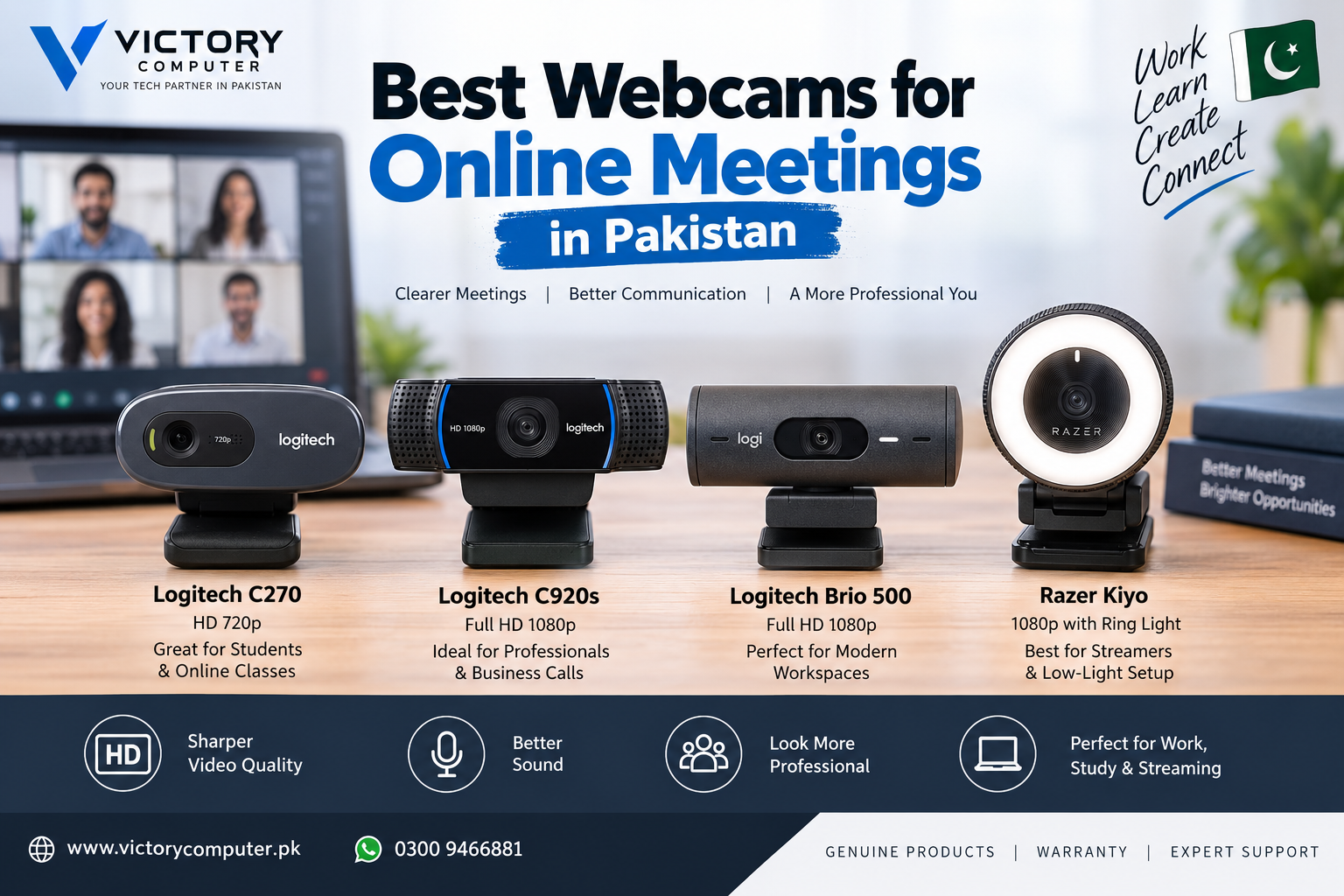
Best Webcams for Online Meetings
The best webcams for online meetings in Pakistan depend mainly on your budget, lighting and how professional you need to look on camera. The Logitech C270 is suitable for basic HD calls, while the Logitech C920s provides 1080p video for professional meetings. The Brio 500 adds meeting-focused features, while the Razer Kiyo is useful when poor lighting is the main problem.
Best Webcams for Online Meetings: Quick Comparison
A 1080p webcam is the practical choice for frequent business meetings, while 720p remains adequate for basic classes and occasional video calls. Buyers working in poor lighting should also consider light correction or dedicated lighting rather than judging a webcam only by resolution.
| Webcam | Video | Best For | Main Advantage | Main Trade-off |
|---|---|---|---|---|
| Logitech C270 | 720p/30fps | Students and basic calls | Simple, affordable HD video | Limited to 720p |
| Logitech C920s Pro HD | 1080p/30fps | Office and remote work | Strong balance of video and audio | No 60fps Full HD |
| Logitech Brio 500 | 1080p | Frequent professional meetings | Auto-framing and light correction | More features than basic users need |
| Razer Kiyo | 1080p/30fps or 720p/60fps | Low-light calls and streaming | Built-in adjustable ring light | Streaming-focused design may be unnecessary for office-only use |
1. Logitech C270 — Best for Basic Meetings and Online Classes
The Logitech C270 is a straightforward option for students, teachers and occasional video callers. It records video at 720p/30fps and includes automatic light correction, making it a sensible upgrade over an older or poor-quality built-in laptop camera.
The 55-degree diagonal field of view keeps the framing relatively tight, which works well when one person is sitting directly in front of the computer.
Pros
- 720p/30fps video is sufficient for basic calls and classes.
- Automatic light correction helps compensate for changing room lighting.
- Compact design works well with laptops and monitors.
- Suitable for buyers who do not need advanced meeting features.
Cons
- Limited to 720p rather than Full HD 1080p.
- Narrower field of view is less suitable for showing multiple people.
- Image quality is more basic than higher-end webcams.
Why We Recommend It
Choose the Logitech C270 if your priority is simple video calling, online classes or occasional meetings. Frequent remote workers who want a noticeably sharper professional image should consider a 1080p model instead.
2. Logitech C920s Pro HD — Best All-Round Webcam for Work
The Logitech C920s Pro HD is the strongest all-round choice in this list for most professionals. It supports 1080p video at 30fps, has a 78-degree field of view, automatic light correction and dual microphones for stereo audio.
The C920s also includes a privacy shutter, a useful feature for an office or home workstation where the webcam may remain connected throughout the day.
Pros
- Full HD 1080p/30fps video.
- Dual microphones provide convenient built-in audio.
- 78-degree field of view works well for individual professional calls.
- Privacy shutter provides physical camera coverage when not in use.
- Good balance between meeting features and simplicity.
Cons
- 1080p is limited to 30fps.
- Users with a dedicated microphone may not benefit much from the built-in stereo microphones.
- Advanced auto-framing features are available on newer premium webcams.
Why We Recommend It
The Logitech C920s is a sensible choice for freelancers, corporate users, teachers and remote workers who regularly use Zoom, Microsoft Teams or other video-conferencing platforms. It provides the important features most professional callers need without moving into 4K webcam territory.
3. Logitech Brio 500 — Best for Frequent Professional Meetings
The Logitech Brio 500 targets users who spend significant time in video meetings. It provides Full HD 1080p video and automatic light correction, while supported software features include auto-framing to help keep the user centered while moving.
Its meeting-oriented features make more sense for corporate users, managers, trainers and professionals who appear on camera frequently than for someone joining only an occasional call.
Pros
- Full HD 1080p video.
- Automatic light correction helps in difficult room lighting.
- Auto-framing can keep the user centered during movement.
- Designed specifically around modern video-meeting use.
Cons
- Costs more than basic 720p and conventional 1080p webcams.
- Some advanced functionality requires Logitech software.
- Extra features may provide little benefit for occasional calls.
Why We Recommend It
Choose the Brio 500 if online meetings are an important part of your daily work and features such as auto-framing and improved light handling matter. For straightforward 1080p calling, the C920s remains the simpler alternative.
4. Razer Kiyo — Best Webcam for Poor Lighting
The Razer Kiyo stands out because an adjustable 5600K ring light is built around the camera lens. The webcam supports 1080p at 30fps or 720p at 60fps and includes autofocus.
The integrated light can be particularly useful for calls from bedrooms, small offices or workspaces where adding a separate key light is inconvenient. The higher 720p frame-rate option also makes the Kiyo more flexible for streaming.
Pros
- Built-in adjustable ring light.
- 1080p/30fps Full HD video.
- 720p/60fps option for smoother motion.
- Autofocus.
- Useful for both meetings and streaming.
Cons
- Ring light is unnecessary in an already well-lit office.
- 1080p mode is limited to 30fps.
- Streaming-oriented features may be unnecessary for ordinary business meetings.
Why We Recommend It
Choose the Razer Kiyo if poor lighting is regularly hurting your video quality or if you want one webcam for both meetings and streaming. In a well-lit office used mainly for business calls, the Logitech C920s or Brio 500 may be a better fit.
What Should You Look for in a Webcam for Online Meetings?
The right webcam for online meetings should match your actual calling environment rather than simply having the highest resolution. Consider these factors before buying:
- Resolution: 720p is adequate for basic calls, while 1080p gives a sharper image for regular professional meetings.
- Lighting: Automatic light correction is useful, but no webcam can fully compensate for extremely poor room lighting.
- Frame rate: 30fps is enough for normal meetings. Higher frame rates are more valuable when movement or streaming matters.
- Field of view: A tighter view is useful for individual calls, while wider framing can help when more than one person needs to appear.
- Microphone: Built-in microphones are convenient, but a dedicated headset or USB microphone can provide better control in noisy rooms.
- Privacy: A physical shutter is useful if the webcam stays connected throughout the working day.
- Autofocus: Autofocus is valuable when you move toward or away from the camera during presentations.
Remote workers building a complete portable setup may also want to read our guide to power banks for laptops in Pakistan. More computer and accessory guidance is available in the Victory Computer buying guides.
Is 720p or 1080p Better for Online Meetings?
1080p is generally the better choice for frequent professional meetings, but 720p remains sufficient for basic video calls and online classes. Resolution should not be considered alone: lighting, focus, internet connection and video-conferencing compression can all affect what other participants actually see.
If you only attend occasional classes or family calls, paying more solely for 1080p may not be necessary. If clients, colleagues or students see you on camera every day, the additional detail from a good 1080p webcam is easier to justify.
Do You Need a 4K Webcam for Zoom or Microsoft Teams?
Most users do not need to buy a 4K webcam purely for normal online meetings. A well-lit 1080p webcam is usually the more practical choice because video-conferencing platforms, network conditions and call settings can prevent participants from seeing the full resolution your camera can capture.
4K becomes more interesting for content creation, recording, cropping or other workflows where the additional captured detail can actually be used.
Which Webcam Should You Buy in Pakistan?
There is no single best webcam for every buyer. Choose according to how often you appear on camera and the conditions in your workspace.
- Choose Logitech C270 for online classes and basic video calls.
- Choose Logitech C920s Pro HD for the best balance of professional 1080p meetings, microphones and straightforward operation.
- Choose Logitech Brio 500 if frequent business meetings justify auto-framing and more advanced meeting features.
- Choose Razer Kiyo if poor lighting or occasional streaming makes the integrated ring light useful.
Before buying a webcam in Pakistan, compare the exact model, warranty terms and current availability rather than relying on an old price range. You can browse computer products and accessories at Victory Computer or contact Victory Computer in Lahore for current product information.
Frequently Asked Questions
Which webcam is best for online meetings in Pakistan?
The Logitech C920s Pro HD is a strong all-round option for professional calls because it combines 1080p/30fps video, automatic light correction, dual microphones and a privacy shutter.
Is a 720p webcam good enough for Zoom meetings?
Yes. A 720p webcam such as the Logitech C270 can be sufficient for classes and basic meetings. Frequent professional callers may benefit more from 1080p.
Which webcam is best for working in a dark room?
The Razer Kiyo is useful in poor lighting because it includes an adjustable ring light around the camera. Improving the room’s overall lighting can also make a major difference.
Do I need a separate microphone with a webcam?
Not necessarily. Many webcams include microphones suitable for normal meetings, but a quality headset or dedicated microphone can provide more controlled audio in noisy environments.
Is 4K necessary for online meetings?
No. A good 1080p webcam is sufficient for most business meetings. 4K is more useful when recording, cropping or producing content where the additional captured resolution can be used.
Where can I buy webcams and computer accessories in Pakistan?
Check current models and availability through Victory Computer. Because prices and inventory change, confirm the current product details before ordering.

About Victory Computer Editorial Team
Victory Computer Editorial Team The Victory Computer Editorial Team publishes informative, research-based content about laptops, computers, monitors, printers, hardware, and technology trends in Pakistan. Our goal is to help readers understand product specifications, compare available options, and make informed purchasing decisions.
View all posts by Victory Computer Editorial Team