
Corsair iCUE H100i RGB 240mm Cooler | Expert review

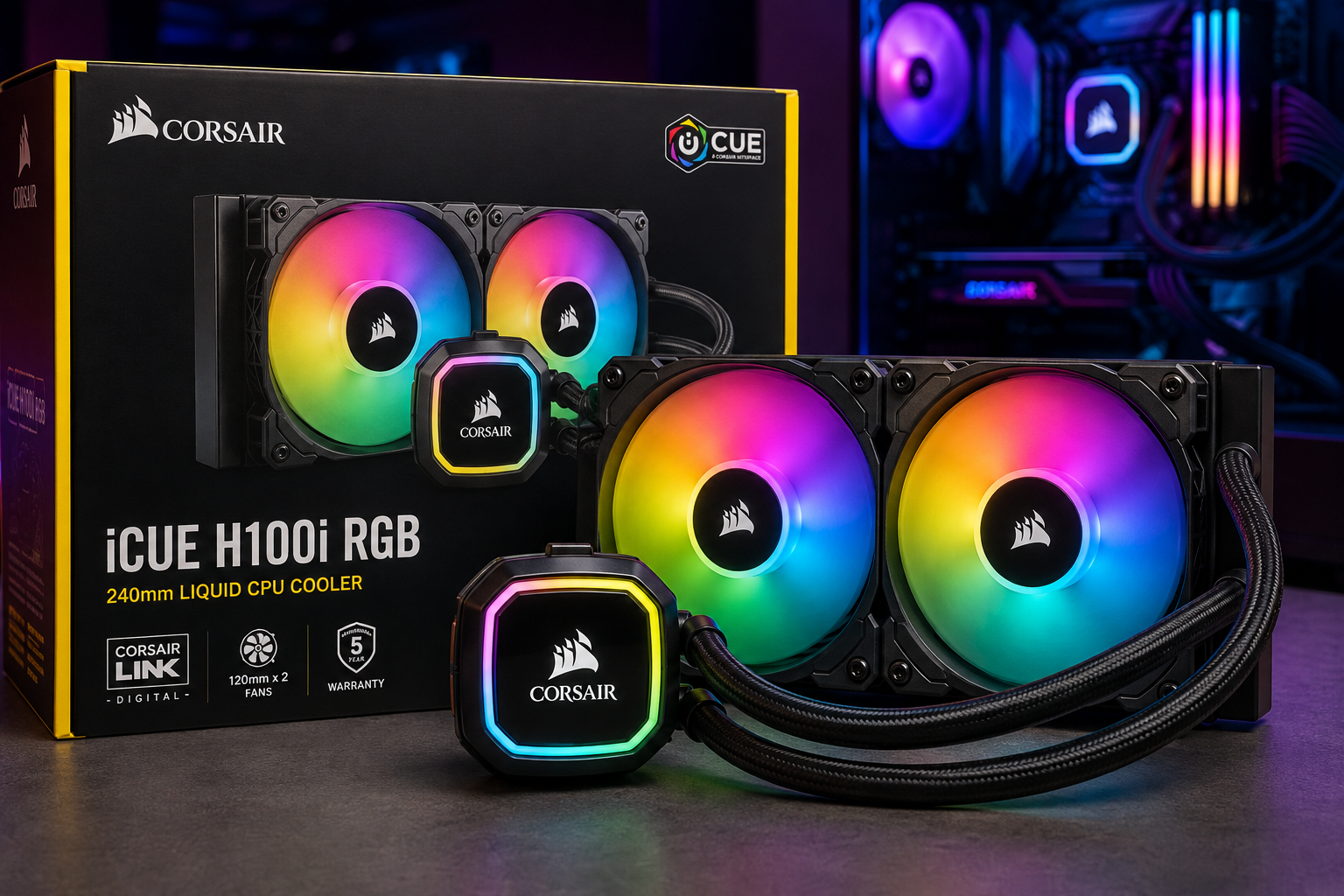
Corsair iCUE H100i RGB 240mm Cooler
The Corsair iCUE H100i RGB 240mm Cooler is a strong choice for PC builders who want liquid CPU cooling, controlled noise and customizable RGB lighting in a compact 240mm format. Its biggest advantages are balanced cooling and iCUE integration, while buyers should consider case compatibility, installation complexity and the higher cost of an AIO compared with basic air cooling.
Quick Verdict: Is the Corsair iCUE H100i RGB 240mm Cooler Worth It?
Yes, for the right PC build. The Corsair H100i makes the most sense for gaming PCs, performance desktops and RGB-focused systems where a 240mm radiator fits comfortably inside the case.
The main reason to choose it over a basic CPU air cooler is the combination of liquid cooling, software control and RGB customization. However, users building a budget office PC or a low-power system may not need to spend extra on a 240mm AIO.
Corsair iCUE H100i RGB 240mm Cooler – Key Features
- 240mm radiator: A practical radiator size for many gaming and performance PC cases.
- Dual 120mm fans: Two radiator fans handle heat dissipation across the 240mm radiator.
- Copper cold plate: Transfers heat away from the CPU into the liquid-cooling loop.
- RGB lighting: Adds customizable lighting to compatible gaming and RGB builds.
- Corsair iCUE integration: Provides software-based monitoring and control on supported H100i configurations.
- PWM fan control: Allows fan speeds to respond to cooling requirements.
- Intel and AMD support: Compatible with a broad selection of modern desktop CPU sockets depending on the exact H100i revision and included mounting hardware.
1. 240mm Cooling Design
The main attraction of the Corsair iCUE H100i RGB 240mm Cooler is its 240mm liquid-cooling design. A 240mm radiator provides considerably more heat-dissipation area than a small 120mm AIO while remaining easier to accommodate than many 280mm and 360mm radiators.
This makes the H100i format particularly useful for gaming PCs and performance systems where CPU temperatures matter but available case space does not justify a larger radiator.
2. Dual-Fan Radiator Setup
The H100i uses two 120mm fans across its radiator. The dual-fan configuration pushes air through the radiator to remove heat carried away from the processor by the liquid loop.
Fan behavior varies according to the exact H100i generation, fan configuration and software settings. Users can prioritize lower noise for everyday workloads or more aggressive cooling during demanding CPU loads.
3. Copper Cold Plate and Pump
A thermally optimized copper cold plate sits over the processor and transfers CPU heat into the cooling system. Corsair combines the cold plate with an integrated pump, removing the need to build or maintain a traditional custom water-cooling loop.
This all-in-one design is one of the H100i’s main advantages for users who want liquid cooling without assembling separate reservoirs, pumps, tubing and radiators.
4. RGB Lighting and Corsair iCUE Control
RGB integration is another major reason to consider the Corsair H100i RGB. Compatible versions integrate with Corsair iCUE, allowing users to manage supported lighting and cooling functions from Corsair’s software environment.
This is particularly useful in systems that already contain Corsair RGB components because compatible devices can be managed through the same ecosystem rather than several unrelated applications.
5. Noise and Fan Control
A good CPU cooler needs to balance temperatures with acoustics. The H100i platform supports controllable fan operation, allowing the system to reduce fan speed when maximum airflow is unnecessary and increase cooling as CPU load rises.
Actual noise depends on the H100i revision, fan speed, case airflow, processor, ambient temperature and cooling profile. Buyers should therefore avoid assuming that every H100i system will produce identical noise levels.
6. Intel and AMD Compatibility
The Corsair H100i family supports a broad selection of Intel and AMD desktop platforms. Current H100i RGB ELITE specifications include support for sockets such as Intel LGA 1700 and AMD AM5/AM4, alongside several older platforms.
Compatibility can vary between H100i generations, so check the exact SKU and included mounting hardware before installation, especially when buying older stock for a newer CPU platform.
7. Installation and Case Compatibility
Before purchasing a 240mm AIO cooler, confirm that the PC case has a suitable 240mm radiator mounting position. Radiator support alone is not always enough; motherboard heatsinks, RAM height, GPU position and case clearance can affect installation.
The H100i uses an all-in-one design, so there is no custom loop to fill. However, installation is still more involved than fitting many basic air coolers because the radiator, fans, pump block, cables and mounting hardware all need correct placement.
Pros and Cons of Corsair iCUE H100i RGB 240mm Cooler
Pros
- 240mm radiator provides a useful balance between cooling capacity and case compatibility.
- Dual-fan cooling is suitable for performance-oriented desktop builds.
- RGB lighting works well in gaming and showcase PCs.
- Corsair iCUE integration provides centralized control on supported configurations.
- Broad Intel and AMD compatibility makes the H100i usable across many desktop platforms.
Cons
- More expensive than basic air cooling for users who do not need an AIO.
- Requires 240mm radiator clearance, so it will not fit every PC case.
- More cables and installation steps than a simple tower air cooler.
- Exact features vary by H100i generation, making the specific SKU important when buying.
Why We Recommend It
The Corsair iCUE H100i RGB 240mm Cooler is most attractive for gamers, enthusiasts and PC builders who want a combination of liquid cooling and RGB customization without moving to a much larger radiator.
Users building inexpensive office computers or systems with modest CPU cooling requirements should also consider a quality air cooler. The additional cost and installation complexity of an AIO may provide little practical benefit in those builds.
H100i 240mm vs Larger AIO Coolers
| Radiator Size | Best For | Main Advantage | Main Trade-off |
|---|---|---|---|
| 120mm | Compact systems | Requires less space | Less radiator surface area |
| 240mm | Gaming and performance PCs | Good size/cooling balance | Needs dual-fan radiator space |
| 280mm | Higher-performance builds | Larger radiator and fans | Wider case compatibility requirement |
| 360mm | High-end systems | Large cooling surface | Needs substantially more case space |
If you are considering a larger radiator, read our Corsair iCUE Titan 280 RX RGB Cooler review. Buyers comparing similar 240mm options can also see the Corsair H100 RGB 240mm Cooler review.
Who Should Buy the Corsair H100i?
- Gamers: Suitable for gaming PCs that need stronger CPU cooling and RGB styling.
- PC enthusiasts: Useful for builders who want software-controlled cooling and lighting.
- Content creators: Worth considering for systems running sustained CPU-heavy workloads.
- RGB PC builders: Particularly attractive when the system already uses compatible Corsair components.
Who Should Consider Another Cooler?
- Budget PC builders who can meet their cooling requirements with a cheaper air cooler.
- Small-form-factor users whose cases cannot accommodate a 240mm radiator.
- Users who do not want RGB lighting or software-based control.
- Builders who need more radiator capacity and have room for a 280mm or 360mm AIO.
Corsair iCUE H100i RGB 240mm Cooler in Pakistan
Pakistani buyers should compare the exact H100i model number, included mounting kit, warranty terms and current price before ordering. Different generations of the H100i can use different fans, controllers and mounting hardware despite having similar product names.
You can check computer hardware and current product listings at Victory Computer in Lahore. For the exact cooler listing, see the Corsair iCUE H100i RGB 240mm Cooler.
WhatsApp: 0300 9466881
Frequently Asked Questions
Is the Corsair iCUE H100i RGB 240mm Cooler good for gaming?
Yes. A 240mm H100i is designed for performance-oriented desktop cooling and is a practical option for many gaming PCs, provided the case has adequate radiator clearance.
What size radiator does the Corsair H100i use?
The model covered in this review uses a 240mm radiator with two 120mm fans.
Does the Corsair H100i support AMD AM5?
Current H100i RGB ELITE specifications include AMD AM5 support. Always confirm the exact H100i SKU and mounting hardware because compatibility differs between generations.
Does the Corsair H100i support Intel LGA 1700?
Current H100i RGB ELITE specifications include Intel LGA 1700 support. Older H100i revisions may require different mounting hardware, so verify the exact model before installation.
Can I control the Corsair H100i with iCUE?
Compatible iCUE H100i models integrate with Corsair iCUE for supported cooling, monitoring and RGB functions.
Is a 240mm AIO better than a 360mm AIO?
Not universally. A 240mm AIO requires less installation space, while a 360mm radiator offers greater radiator surface area and may be more appropriate for demanding high-end builds.
Final Verdict
The Corsair iCUE H100i RGB 240mm Cooler offers a practical combination of liquid CPU cooling, RGB customization and a radiator size that fits more cases than larger AIO designs.
Choose the H100i if you want a performance-oriented 240mm AIO with Corsair ecosystem integration. Consider a quality air cooler for a budget build, or a larger AIO if your processor and workload justify additional cooling capacity and your case has enough room.

About Victory Computer Editorial Team
Victory Computer Editorial Team The Victory Computer Editorial Team publishes informative, research-based content about laptops, computers, monitors, printers, hardware, and technology trends in Pakistan. Our goal is to help readers understand product specifications, compare available options, and make informed purchasing decisions.
View all posts by Victory Computer Editorial Team
One thought on “Corsair iCUE H100i RGB 240mm Cooler | Expert review”