
M4 Chip vs Intel: 7 Powerful Reasons Apple Keeps Winning

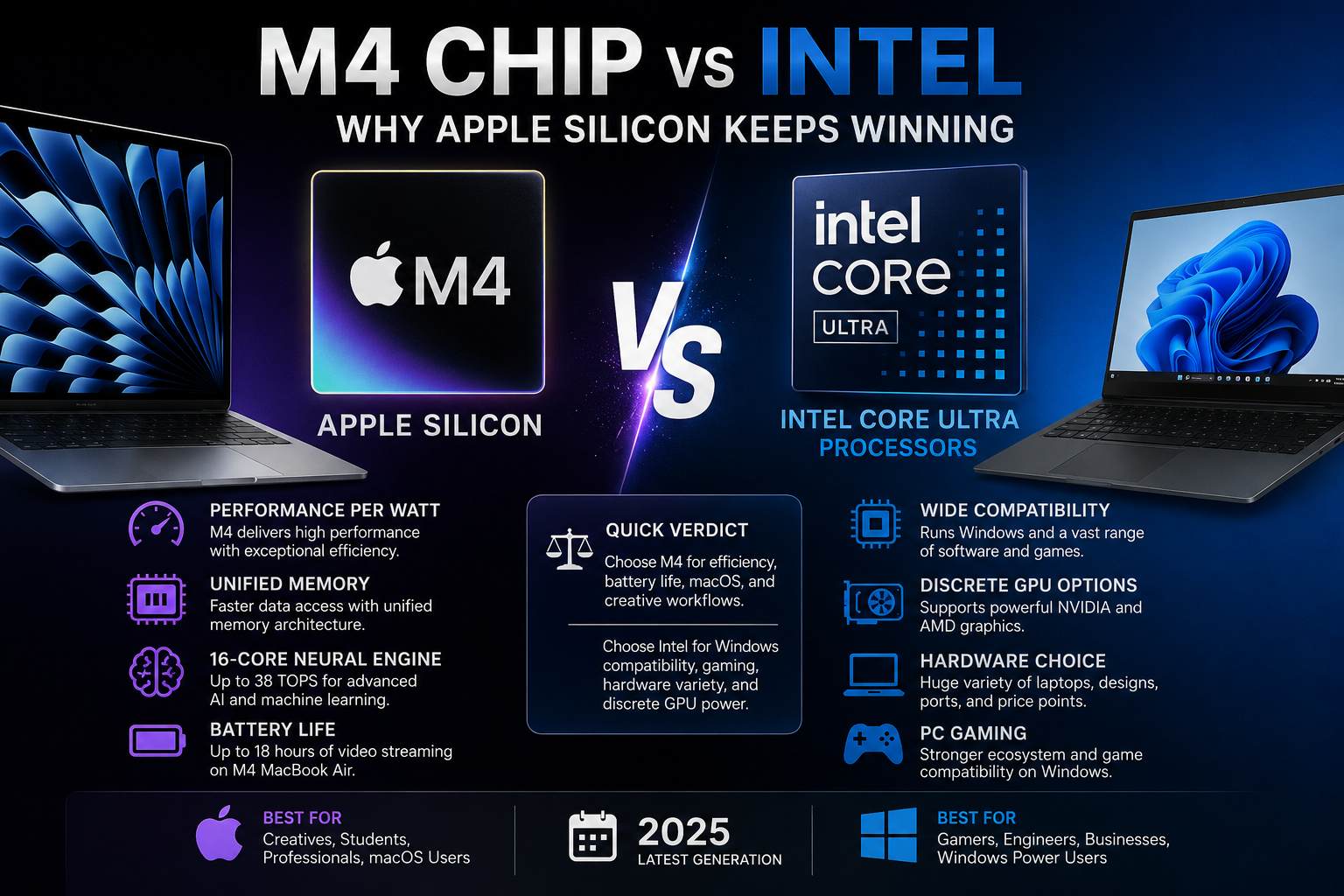
M4 Chip vs Intel: Why Apple Silicon Keeps Winning — Expert Review
M4 Chip vs Intel is not a simple story of one processor beating another. Apple M4's biggest advantage is the combination of strong CPU performance, efficient integrated graphics, unified memory, dedicated media hardware, AI acceleration, and tight macOS integration. Intel remains the stronger choice for many Windows, gaming, compatibility, and hardware-flexibility requirements.
M4 Chip vs Intel: Quick Verdict
Apple M4 has a particularly strong position in thin-and-light laptops because Apple controls the processor architecture, operating system, memory design, media engines, and the Mac hardware around the chip. That integration allows Apple to optimize the entire computer instead of treating the CPU as an isolated component.
For users prioritizing battery life, quiet operation, portability, macOS, content creation, and performance per watt, an M4 Mac can be extremely compelling. Intel-based PCs remain more flexible because buyers can choose from a much larger Windows ecosystem, numerous laptop designs, gaming configurations, discrete GPUs, and specialized business hardware.
| Area | Apple M4 | Intel Laptop Platforms |
|---|---|---|
| Performance per watt | Major strength | Varies significantly by processor and laptop |
| Battery-focused laptops | Excellent fit | Strong on modern efficiency-focused platforms |
| Unified hardware/software design | Major advantage | Multiple OEM hardware designs |
| Windows software | Limited or requires alternatives/virtualization | Native advantage |
| PC gaming | Improving | Major advantage |
| Hardware choice | Limited Mac lineup | Huge ecosystem |
| Dedicated GPU options | Apple integrated GPU architecture | Wide NVIDIA/AMD options |
Why Does Apple Silicon Have an Advantage?
Apple Silicon's central advantage is vertical integration. Apple designs the chip, Mac hardware, macOS, development frameworks, and many of the applications that run on the platform.
The M4 is a system on a chip rather than simply a conventional standalone CPU. Apple integrates CPU cores, GPU resources, a Neural Engine, memory architecture, media engines, and other controllers into the platform.
Apple's base M4 configuration used in the 2025 MacBook Air includes a 10-core CPU with four performance cores and six efficiency cores, an 8-core or 10-core GPU depending on configuration, a 16-core Neural Engine, and 120GB/s memory bandwidth. The GPU also supports hardware-accelerated ray tracing. Apple rates the M4 Neural Engine at up to 38 trillion operations per second.
This system-level approach is a major reason why Apple Silicon matters beyond simple benchmark scores.
M4 Chip vs Intel: Performance Is Only Half the Story
The important comparison is not simply which processor can produce the highest score. Laptop processors operate inside strict thermal and power limits, so useful performance must also be considered alongside power consumption, cooling, noise, chassis size, and battery life.
Apple designed M4 using second-generation 3-nanometer technology. The architecture combines performance cores for demanding tasks with efficiency cores for lighter workloads.
Intel follows its own hybrid approach on modern Core Ultra processors. Intel's current laptop portfolio also spans very different power classes, which is why saying “M4 is faster than Intel” without naming the Intel processor and laptop is misleading.
For example, Intel Core Ultra 200V processors target thin-and-light systems, while higher-power Core Ultra H/HX-class designs target different performance requirements. A fair comparison must therefore consider the complete laptop, not just the logo printed beside the keyboard.
Unified Memory Is One of Apple's Most Important Advantages
Apple's unified memory architecture allows major processing components to work from a shared high-bandwidth memory pool. CPU and GPU workloads therefore operate within a tightly integrated memory architecture rather than following the same design used by many traditional PC configurations.
The base M4 in the MacBook Air provides 120GB/s of memory bandwidth, while the 2025 M4 MacBook Air starts with 16GB of unified memory and can be configured with 24GB or 32GB.
This architecture can be particularly useful for graphics, creative applications, and workloads where multiple processing engines need efficient access to data.
There is an important trade-off: Mac memory is not designed as a conventional user-upgradeable RAM configuration. Buyers should therefore select enough memory when purchasing the machine.
M4 Graphics and Media Performance Are Built Into the SoC
M4 includes an integrated GPU architecture with Dynamic Caching, hardware-accelerated ray tracing, and hardware-accelerated mesh shading. Apple also includes dedicated media hardware rather than relying entirely on general CPU or GPU resources for supported video workflows.
The M4 MacBook Air media engine provides hardware acceleration for H.264, HEVC, ProRes, and ProRes RAW, along with dedicated video encode/decode capabilities and AV1 decode.
That makes M4 particularly interesting for creators using optimized applications and media formats.
Intel laptops have a different advantage: buyers can move far beyond integrated graphics. Windows systems are available with dedicated NVIDIA GeForce RTX and AMD Radeon GPUs, which can dramatically change performance in gaming, 3D rendering, engineering software, AI development, and GPU-heavy professional applications.
So Apple has a strong integrated architecture, but M4 should not be treated as a universal replacement for a powerful discrete GPU.
M4 vs Intel for AI: Both Platforms Now Have Dedicated Hardware
AI acceleration is becoming a standard part of modern laptop processors. M4 contains a 16-core Neural Engine capable of up to 38 trillion operations per second according to Apple.
The Neural Engine works alongside machine-learning accelerators in the CPU, the GPU, and Apple's unified memory system. This gives developers several hardware paths for on-device machine-learning workloads.
Intel has also made dedicated AI acceleration a core part of the Core Ultra platform through its NPU architecture. Modern Intel PCs therefore should not be described as conventional CPU-only systems.
The practical winner depends heavily on software. An application optimized for Apple's frameworks may perform very differently from an application optimized for Windows, Intel acceleration, CUDA, or another PC-oriented stack.
Why M4 MacBooks Are So Strong for Battery Life
Efficiency becomes especially valuable in a laptop because lower power requirements can improve mobility and reduce cooling demands.
Apple rates both the 13-inch and 15-inch 2025 M4 MacBook Air for up to 18 hours of video streaming and up to 15 hours of wireless web use under Apple's specified testing conditions.
Those are manufacturer figures rather than guarantees for every user. Screen brightness, applications, browser workload, external devices, background processes, and workload intensity can all change real battery life.
The broader advantage is architectural: Apple can design the battery, cooling strategy, macOS power management, and M4 chip as parts of the same product.
Readers interested specifically in Mac efficiency can also see our M4 MacBook battery life comparison.
Where Does Intel Still Beat Apple M4?
Intel remains the better choice for many users because computing is about software and hardware compatibility as much as processor efficiency.
1. Windows Compatibility
If your work depends on Windows-native software, specialized enterprise tools, engineering programs, legacy applications, or hardware designed around Windows PCs, an Intel laptop may be the safer choice.
2. PC Gaming
Windows remains the broader PC gaming ecosystem. Intel laptops can also be paired with powerful NVIDIA and AMD discrete graphics, giving buyers far more gaming hardware combinations.
Apple has improved Mac gaming support and M4 offers capable integrated graphics, but users primarily buying a laptop for gaming should examine game compatibility before choosing macOS. Our guide to gaming on M4 MacBooks explores that distinction in more detail.
3. Hardware Variety
Intel processors appear across a huge selection of notebooks: affordable everyday systems, business laptops, convertibles, mobile workstations, gaming notebooks, and premium ultraportables.
Apple offers fewer hardware designs because M-series processors are exclusive to Apple's own products.
4. Upgrade and Repair Flexibility
Some Windows laptops provide replaceable SSDs, memory modules, multiple storage slots, or other serviceable components. The exact options vary by model, but the PC ecosystem gives buyers substantially more hardware configurations to choose from.
Apple M4 Pros and Cons
Pros
- Strong performance-per-watt approach
- Integrated CPU, GPU, Neural Engine, memory, and media architecture
- Excellent fit for thin and quiet MacBooks
- Dedicated ProRes and video media engines
- Strong macOS hardware/software integration
Cons
- Limited to Apple's hardware ecosystem
- Memory and storage choices should be made carefully at purchase
- Windows-specific software may create compatibility problems
- Not the first choice for many PC gamers
Intel Laptop Pros and Cons
Pros
- Massive selection of Windows laptops
- Broad legacy and professional software compatibility
- Strong gaming ecosystem
- Available with powerful dedicated GPUs
- More choice in form factors, ports, components, and price classes
Cons
- Performance, efficiency, cooling, and battery life can vary significantly between laptop designs
- The user experience depends heavily on the individual laptop manufacturer
- Comparing Intel processors by brand name alone can be confusing because different power classes target very different devices
M4 Chip vs Intel: Which Should You Buy?
Choose an M4 Mac if battery-focused mobility, macOS, quiet operation, creative workflows, and Apple's integrated ecosystem are your priorities. Choose an Intel PC if Windows compatibility, gaming, hardware choice, specialized software, discrete graphics, or configuration flexibility matter more.
For students, office professionals, programmers, photographers, musicians, and mobile creators already comfortable with macOS, M4 can offer an excellent balance between performance and efficiency.
For gamers, engineers using Windows-specific applications, users requiring NVIDIA GPUs, businesses with Windows infrastructure, and buyers wanting a wider range of laptop configurations, Intel-based PCs remain highly relevant.
The broader MacBook vs Windows laptop comparison is therefore just as important as comparing the processors themselves.
Why We Recommend Comparing the Complete Laptop
The biggest mistake in an M4 Chip vs Intel comparison is choosing a winner from the processor name alone. Display quality, memory capacity, SSD size, GPU configuration, cooling, ports, operating system, software compatibility, battery size, and price can matter just as much as CPU architecture.
Apple Silicon keeps gaining attention because Apple controls more of the complete computing platform. M4 combines CPU, GPU, Neural Engine, unified memory architecture, and media acceleration inside a tightly optimized ecosystem.
Intel's strength is different: choice. The Intel ecosystem covers an enormous range of Windows PCs and allows manufacturers to combine Intel processors with different displays, cooling systems, memory configurations, storage, ports, and discrete GPUs.
For buyers in Pakistan, compare the complete machine and your required applications before deciding. You can explore computers, laptops, and technology guides at Victory Computer.
Frequently Asked Questions
Is the Apple M4 better than Intel?
M4 can be the better choice for efficiency-focused Mac laptops, but there is no single “Intel” processor to beat. Intel offers multiple processor families and power classes, so the correct comparison depends on the specific Intel CPU, laptop, and workload.
Is M4 better than Intel Core Ultra?
It depends on the Core Ultra processor and application. M4 has major strengths in Apple's integrated hardware/software ecosystem, while Core Ultra PCs provide Windows compatibility and a much wider range of hardware configurations.
Is M4 good for video editing?
Yes. M4 includes dedicated hardware acceleration for H.264, HEVC, ProRes, ProRes RAW, video encoding and decoding, making supported creative workflows one of its important strengths.
Is M4 better than Intel for gaming?
Not universally. M4 has capable integrated graphics, but Windows PCs offer broader game compatibility and can be configured with powerful discrete NVIDIA or AMD GPUs.
Why is Apple Silicon power efficient?
Apple combines performance and efficiency CPU cores with tightly integrated GPU, memory, media, AI, operating-system, and hardware design. This allows Apple to optimize the Mac as a complete platform rather than only optimizing the processor.
Should I buy an M4 MacBook or Intel laptop?
Choose M4 for macOS, mobility, efficiency, and Apple-focused creative workflows. Choose an Intel laptop when Windows software, gaming, hardware variety, dedicated GPU options, or specialized PC compatibility are more important.