
U vs H vs HS vs HX vs G Processors: What Do Laptop Processor Letters Mean?

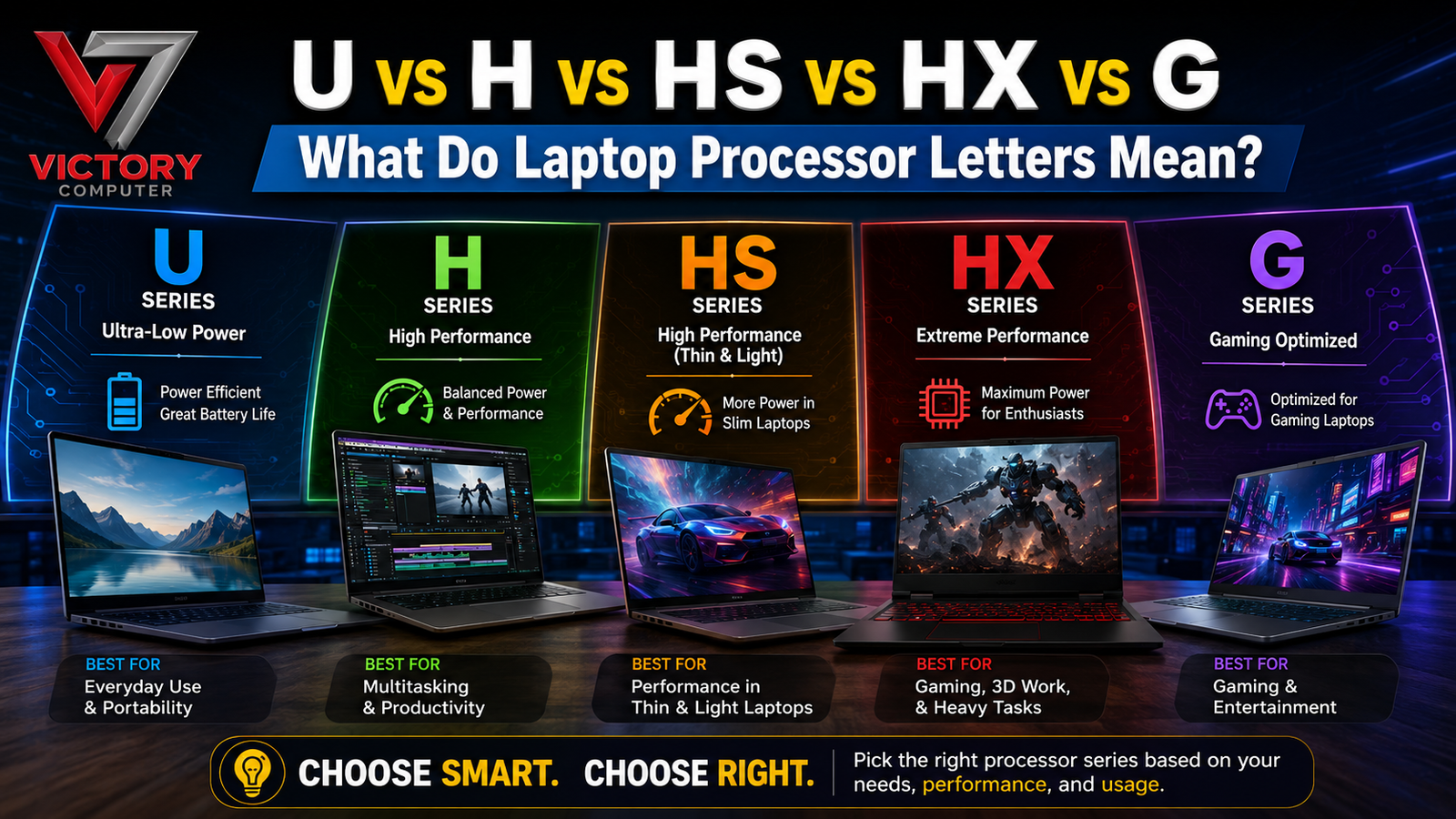
TL;DR:
- U: Designed primarily for power efficiency, thin laptops and everyday productivity.
- H: High-performance mobile processors designed for demanding workloads.
- HS: High-performance processors designed to deliver strong performance within a relatively efficient power envelope, especially common in thin gaming and creator laptops.
- HX: The performance-focused option, generally offering the highest CPU performance potential in laptop platforms and commonly found in gaming/workstation-class machines.
- G: Historically used by Intel for processors with enhanced integrated graphics, although the exact meaning depends on the processor generation and Intel naming scheme.
- A processor letter does not tell the whole story. Cooling, RAM, SSD, GPU, battery capacity and chassis design can dramatically affect real-world performance.
- For Lahore’s heat, cooling quality is especially important when buying H, HS or HX laptops.
Introduction
The laptop market in Pakistan is facing continuing price pressure, and the latest price hike means buyers need to understand exactly what they are paying for before purchasing a new machine. A Core i5, Core i7, Ryzen 5 or Ryzen 7 name alone does not tell you how a laptop will actually perform. The letters attached to the processor—U, H, HS, HX or G—can indicate a major difference in power consumption, thermal requirements and performance.
Understanding laptop processor letters meaning is therefore essential when comparing laptops for university, office work, programming, content creation or gaming. The wrong processor class can leave you paying more for performance you never use—or buying an underpowered machine for demanding workloads.
With currency fluctuations and stock changes affecting laptop prices in Pakistan, purchasing from a trusted source is equally important. Victory Computer PK, located at Shop 51-A, 1st Floor, Hafeez Center, Lahore, allows customers to physically inspect products, verify warranty information and confirm 100% original stock before purchasing.
1. What Do Laptop Processor Letters Actually Mean?
Understanding CPU Suffixes
The easiest way to understand laptop processor suffixes is to treat the final letter as a clue about the processor’s intended design.
However, the suffix should never be interpreted in isolation. Intel and AMD have used different naming conventions across generations, so the exact technical specifications always need to be checked.
U-Series: Efficiency and Mobility
U-series processors are designed around efficiency. They are commonly found in thin-and-light laptops intended for:
- Microsoft Office
- Web browsing
- Online meetings
- University work
- SEO and business applications
- Streaming
- General multitasking
- Long battery sessions
When comparing U vs H processors, U models generally prioritise lower power consumption and easier thermal management.
H-Series: High Mobile Performance
H-series processors are designed for substantially higher performance than traditional U-series mobile processors.
They are frequently used in:
- Gaming laptops
- Performance notebooks
- Video editing systems
- Programming workstations
- Engineering applications
- 3D applications
- Heavy multitasking
The higher power envelope means manufacturers need stronger cooling.
HS-Series: Performance in a More Efficient Design
HS processors are commonly associated with high-performance laptops that attempt to balance performance with efficiency and chassis size.
They can be an excellent middle ground for users who need significantly more performance than an everyday U-series laptop but do not necessarily need the maximum CPU configuration of an HX machine.
HX-Series: Maximum Performance Focus
HX processors are positioned toward the top end of mobile CPU performance. They are commonly found in powerful gaming laptops and mobile workstations.
When examining HS vs HX processors, HX is generally aimed at users who prioritise sustained CPU performance over portability and efficiency.
G-Series: What Does G Mean?
The G suffix requires more caution because its meaning has varied by generation and platform.
Intel has historically used G to identify processors with enhanced graphics capabilities in certain product families. Therefore, buyers should check the complete processor model rather than assuming that every G processor has identical graphics characteristics.
2. U vs H vs HS vs HX: Performance Explained
Comparing Performance Classes
A processor’s performance depends on more than its advertised maximum clock speed.
Core and Thread Count
More cores and threads can improve performance in workloads that support parallel processing.
For example:
| Processor Class | Typical Focus | Multitasking | Sustained Workloads | Battery Focus |
| U | Efficiency | Good | Moderate | Excellent |
| H | Performance | Very Good | High | Moderate |
| HS | Performance + Efficiency | Very Good | High | Good |
| HX | Maximum Performance | Excellent | Very High | Lower |
| G | Depends on Generation | Varies | Varies | Varies |
This is why simply comparing GHz is not enough.
Clock Speed Is Not Everything
Two processors may advertise similar boost frequencies but deliver different real-world results because of differences in:
- Core architecture
- Number of cores
- Thread count
- Cache
- Power limits
- Cooling
- RAM configuration
- Laptop motherboard
- Firmware
- Thermal throttling
Understanding laptop processor letters meaning helps you identify the intended performance class before comparing the detailed specifications.
Benchmark Performance vs Real-World Performance
Synthetic benchmarks can be useful, but laptop performance should always be considered within the machine’s thermal design.
A powerful HX processor in a poorly cooled chassis may reduce its clock speeds during prolonged workloads. Conversely, a well-designed HS laptop can maintain excellent performance while producing less heat and fan noise.
Why Cooling Matters in Lahore
Lahore’s hot summer temperatures can reduce the thermal headroom available to a laptop.
A gaming or workstation laptop operating in a cool room has more opportunity to dissipate heat than the same machine working in a hot environment.
For H, HS and HX systems, look for:
- Dual-fan cooling
- Multiple heat pipes
- Large ventilation openings
- Efficient exhaust placement
- Adequate thermal interface material
- Performance fan modes
- Separate GPU and CPU cooling paths where appropriate
This is particularly important if the laptop will be used for gaming, rendering or long programming sessions.
3. Which Processor Letter Should You Choose?
U-Series for Students and Office Users
Choose U when portability and battery life are more important than maximum performance.
Ideal Workloads
A U-series laptop is usually sufficient for:
- WordPress management
- SEO tools
- Google Workspace
- Microsoft Office
- Browsing
- Zoom and Teams
- Research
- Accounting
- University assignments
If you spend most of your day away from a charger, the efficiency advantage can be more valuable than additional CPU performance.
H-Series for Power Users
H processors make sense when your workloads regularly push the CPU.
Recommended For
- Software development
- Video editing
- Photoshop
- Large spreadsheets
- Data processing
- Virtual machines
- Engineering software
- Heavy multitasking
When evaluating U vs H processors, think about how long your workloads run. Occasional heavy tasks may not justify an H-series laptop, while daily rendering or compilation can make the additional performance worthwhile.
HS-Series for Balanced Performance
HS processors are attractive when you want a powerful laptop without necessarily choosing the largest and heaviest performance chassis.
Best Use Cases
HS systems can work particularly well for:
- Content creators
- Developers
- Students studying technical subjects
- Mobile professionals
- Gamers wanting better portability
They offer an appealing balance between performance and efficiency.
HX-Series for Enthusiasts
HX processors are aimed at buyers who want maximum CPU capability.
Ideal Users
Consider HX if you regularly perform:
- 4K video production
- 3D rendering
- CPU-intensive simulation
- Professional development
- Large-scale compilation
- High-end gaming
- Heavy virtualisation
The trade-off is that HX machines are often larger, heavier, hotter and more expensive.
4. Three Processor Classes You Should Compare
The following examples illustrate three common performance categories rather than recommending a specific brand or configuration.
| Processor Example | Class | Typical Positioning | Best For | Cooling Requirement |
| Intel Core i5-1335U | U | Efficient mobile | Office, study, business | Low–Moderate |
| AMD Ryzen 7 7840HS | HS | High performance + efficiency | Creation, coding, gaming | High |
| Intel Core i9-14900HX | HX | Extreme mobile performance | Gaming, rendering, workstation use | Very High |
The specifications of individual processor generations can vary significantly, so always verify the exact CPU model before purchasing.
RAM Can Change the Experience
A powerful processor paired with insufficient RAM can still produce a poor experience.
For modern laptop buying, consider:
- 8GB: Basic computing
- 16GB: Recommended for most serious users
- 32GB: Heavy multitasking, development and creative work
- 64GB+: Specialist professional workloads
Dual-channel or properly configured memory can also improve performance, particularly when integrated graphics are being used.
SSD Performance Matters
CPU performance is only one component of overall system responsiveness.
A modern NVMe SSD can significantly improve:
- Windows boot times
- Application loading
- File transfers
- Project loading
- Game loading
- General system responsiveness
This is another reason laptop processor suffixes should never be used as the only buying criterion.
5. Battery Life, Heat and Laptop Design
Battery Capacity
A U processor can support excellent battery efficiency, but battery life still depends on:
- Battery watt-hours
- Display brightness
- Screen resolution
- Refresh rate
- GPU activity
- Wi-Fi usage
- Background applications
- Operating system power settings
An H or HX laptop with a large battery can still provide reasonable runtime during light workloads, but demanding applications can rapidly increase power consumption.
Display and GPU Impact
A 165Hz or 240Hz gaming display can consume more power than a basic 60Hz panel.
Likewise, a dedicated GPU can dramatically increase power consumption when activated.
Therefore, buyers should evaluate the entire laptop platform rather than assuming the CPU letter determines battery life.
Lahore Heat and Thermal Throttling
Thermal throttling occurs when a laptop reduces processor performance to stay within safe temperature limits.
In hot environments, thermal management becomes even more important.
What to Check Before Buying
Ask about:
- Fan configuration
- Heat pipe design
- CPU/GPU thermal behaviour
- Warranty coverage
- Charger authenticity
- Battery condition where applicable
- Upgrade options
At Victory Computer PK, customers can request physical inspection at our Lahore outlet before completing a purchase.
6. How to Buy the Right Processor in Pakistan
Don’t Buy Based on the Letter Alone
The best laptop processor in Pakistan depends on your workload.
A U processor can be the smarter choice than an HX processor if you primarily need battery life and portability. Similarly, paying extra for a premium HX laptop makes little sense if your daily work is Microsoft Word and web browsing.
Use This Decision Guide
| Your Requirement | Recommended Class |
| Office work | U |
| Student use | U |
| Long battery sessions | U |
| Programming | H / HS |
| Video editing | H / HS / HX |
| Gaming | H / HS / HX |
| 3D rendering | HX |
| Mobile workstation | HX |
| Balanced performance | HS |
Check Hafeez Center Prices Carefully
Laptop pricing can change because of exchange rates, import costs and stock availability. When comparing Hafeez Center prices, always compare identical configurations.
A laptop with the same processor can have a completely different value proposition depending on:
- RAM
- SSD
- GPU
- Display
- Battery
- Warranty
- Build quality
Buy With Warranty Verification
Victory Computer PK focuses on helping customers verify product details before purchase.
At Shop 51-A, 1st Floor, Hafeez Center, Lahore, customers can inspect their selected laptop and discuss warranty coverage before making a decision.
For customers who cannot visit personally, Delivery in Gulberg/DHA provides an additional purchasing option.
Buying Tip: Don’t compare only the CPU suffix. Check the exact processor model, RAM, SSD, display, GPU, battery, cooling and warranty before paying.
FAQ
How to Choose Between U, H, HS and HX Processors?
Start with your workload. Choose U for efficiency and everyday computing, H for demanding workloads, HS for a balance of performance and efficiency, and HX for maximum mobile CPU performance.
How to Check a Laptop Processor Before Buying?
Check the complete processor model in Windows System Information, BIOS or the manufacturer’s specification page. Do not rely only on the Core i5, Core i7 or Ryzen 7 label.
Where to Buy Original Processor-Based Laptops in Lahore?
You can visit Victory Computer PK at Shop 51-A, 1st Floor, Hafeez Center, Lahore, where you can request physical inspection and check warranty details before purchasing.
Where to Check Hafeez Center Prices and Stock?
Check the current available configurations with Victory Computer PK and compare the complete specification rather than comparing processor names alone. Stock and pricing can change quickly.
Price of U, H, HS and HX Laptops in Pakistan?
There is no single price because processor class is only one part of the laptop configuration. RAM, SSD, GPU, display, generation, warranty and stock availability all affect the final price.
Final Verdict: Which Processor Letter Is Best?
There is no universally best processor suffix. The right choice depends on what you actually do with your laptop.
Choose U when efficiency, portability and battery life are your priorities. Choose H when you need strong sustained performance. Choose HS when you want a powerful but relatively balanced mobile system. Choose HX when maximum CPU performance matters more than weight, battery life and price.
The most important lesson about laptop processor letters meaning is that the letter represents a design direction, not a complete performance score.
Before buying, compare the complete configuration, check cooling, verify warranty information and inspect the laptop whenever possible. At Victory Computer, customers can perform physical inspection at our Lahore outlet, confirm warranty details and verify 100% original stock.
Waiting can also become expensive. Currency fluctuations, import costs and limited inventory can push prices higher or make a particular configuration unavailable. If you have already identified the right machine for your workload, delaying the purchase simply to wait for a lower price can work against you.
For Lahore buyers, check current Hafeez Center prices, verify the complete configuration and choose based on workload—not marketing. Victory Computer PK can help you make that decision with original stock, warranty checking and convenient Delivery in Gulberg/DHA.