
Best Office PCs in Pakistan for Businesses | Expert review

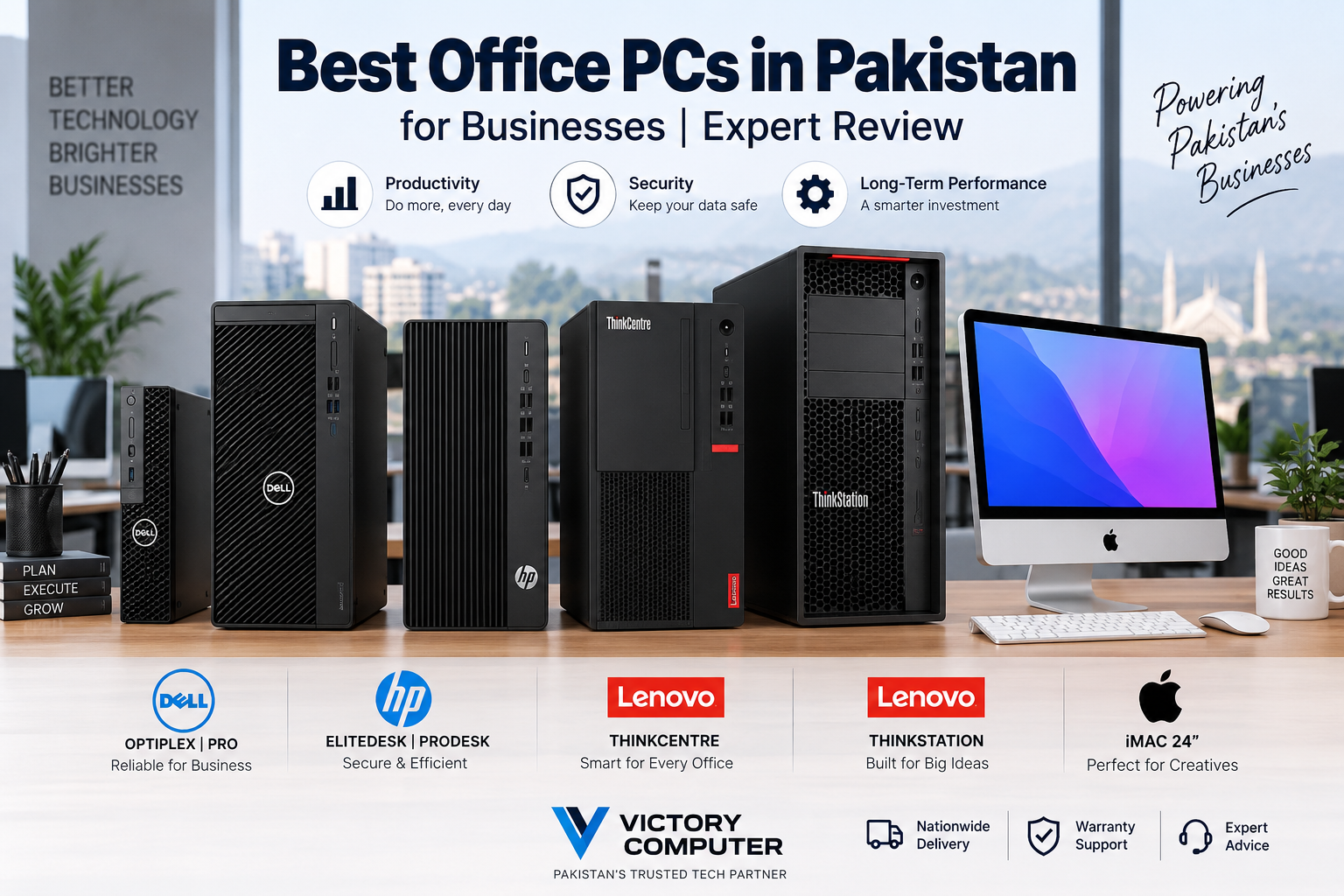
Best Office PCs in Pakistan for Businesses
Choosing the best office PCs in Pakistan is less about buying the fastest computer and more about matching the system to the work your employees actually perform. A reliable business PC should provide enough performance for daily applications, sufficient memory for multitasking, fast SSD storage, practical connectivity, security features, and room for future upgrades where required.
For most Pakistani offices, an Intel Core i5 or comparable AMD processor, 16GB RAM and a 512GB SSD is a sensible starting configuration. Basic reception, POS, data-entry, and administrative systems can sometimes work with less, while engineering, video production, architecture, analytics, and other demanding workloads may justify significantly more powerful hardware.
Quick Comparison: Best Office PCs in Pakistan
| PC Family | Best For | Main Advantage | Main Trade-off |
|---|---|---|---|
| Dell Pro / OptiPlex | General corporate offices | Business-focused design and manageability | Premium configurations can cost more |
| HP EliteDesk / ProDesk | SMEs and corporate deployments | Multiple form factors and business security | Upgradeability varies by form factor |
| Lenovo ThinkCentre | Everyday professional workloads | Compact and expandable business options | Tiny models have less expansion room |
| Lenovo ThinkStation | Engineering, CAD and professional workloads | Workstation-class expansion and performance | Overkill for basic office applications |
| Apple iMac 24-inch | Creative and design-focused offices | Excellent integrated display and compact setup | Limited internal upgradeability |
1. Dell Pro and OptiPlex — Best for General Business Use
Dell business desktops are a practical choice for companies that want standardized systems for accounting, administration, browser-based applications, Microsoft Office, ERP software, call-center operations, and general productivity.
Dell has been moving its newer professional desktop portfolio toward the Dell Pro naming structure, while OptiPlex systems remain widely recognized in the business-PC market. Buyers in Pakistan may therefore encounter both product families depending on the model generation and available inventory.
Micro systems are useful where desk space is limited, while slim and tower designs generally provide more flexibility for upgrades and additional hardware. This makes the range suitable for everything from reception desks to larger corporate deployments.
Pros
- Business-focused construction and manageability.
- Micro, slim and tower form factors suit different office environments.
- Good choice for standardized corporate deployments.
- Tower configurations can provide useful upgrade flexibility.
Cons
- Business-oriented configurations may cost more than basic consumer desktops.
- Very compact models offer less internal expansion than towers.
- Older OptiPlex and newer Dell Pro naming can make model comparison confusing.
Why We Recommend It
Dell business desktops make the most sense for organizations prioritizing reliability, deployment flexibility and straightforward everyday productivity. Choose a tower when future expansion matters; choose a Micro or Slim model when saving desk space is more important.
2. HP EliteDesk and ProDesk — Best for Growing Businesses
HP EliteDesk and HP ProDesk systems are designed around professional workloads rather than gaming. HP currently offers its business desktops across Mini, Small Form Factor, Tower and All-in-One designs, depending on the series.
For a growing company, that variety is useful. A small office may deploy compact systems for administration and customer service while using larger desktops for employees who require additional storage, memory or expansion.
HP also positions security and manageability as major parts of its business-PC portfolio, which becomes increasingly relevant as an organization adds employees and devices.
Pros
- Wide selection of business-oriented form factors.
- Good fit for everyday productivity and corporate applications.
- Business security and management features are a key focus.
- Options are available for both space-saving and expandable deployments.
Cons
- Upgrade options differ substantially between Mini, SFF and Tower systems.
- Higher-tier Elite configurations may be unnecessary for basic clerical work.
- Exact features depend heavily on the individual model and configuration.
Why We Recommend It
HP ProDesk is a sensible starting point for general business computing, while EliteDesk models suit organizations requiring higher-end configurations or additional enterprise-oriented capabilities. Compare the exact configuration rather than choosing solely by the EliteDesk or ProDesk badge.
3. Lenovo ThinkCentre — Best Balanced Office PC
Lenovo ThinkCentre desktops are aimed directly at professional and business environments. The range includes different sizes, including Tiny, Small Form Factor and Tower-style systems, making it easier to standardize PCs across departments with different workspace requirements.
ThinkCentre systems are particularly relevant for accounting departments, schools, offices, customer-support teams, developers and employees running multiple productivity applications simultaneously.
For companies planning to keep their computers for several years, choosing the right chassis matters. Tiny systems save substantial space, but a larger desktop generally provides more flexibility when additional storage, expansion cards or other upgrades become necessary.
Pros
- Designed specifically around business workloads.
- Multiple form factors for different office layouts.
- Good balance between performance, security and manageability.
- Larger models can provide useful expansion options.
Cons
- Tiny PCs sacrifice some expansion flexibility.
- High-performance configurations may not be necessary for ordinary office work.
- Available specifications can vary considerably between ThinkCentre generations.
Why We Recommend It
ThinkCentre is a strong choice for businesses that need dependable Windows desktops without moving into expensive workstation hardware. It is especially suitable when a company wants compact PCs for some departments and more expandable systems for others.
4. Lenovo ThinkStation — Best for Engineering and Professional Workloads
A normal office desktop and a workstation serve different purposes. If your business uses 3D CAD, BIM, professional rendering, engineering applications, simulation, large datasets or other compute-intensive software, a Lenovo ThinkStation may be more appropriate than an ordinary business PC.
ThinkStation systems are designed for heavier professional workloads and selected models provide workstation processors, professional NVIDIA graphics, extensive memory capacity, greater expansion and ISV-certified configurations.
That additional capability comes at a cost. Buying a workstation for Word, Excel, email and browser applications usually provides little practical benefit compared with a properly configured standard business desktop.
Pros
- Designed for demanding professional applications.
- Strong CPU, memory, storage and professional GPU options.
- Greater expansion potential on workstation-class towers.
- Suitable for engineering, architecture, 3D and professional creative workflows.
Cons
- Significantly more expensive than ordinary office PCs.
- Higher-performance configurations consume more power.
- Unnecessary for standard accounting, email and administrative work.
Why We Recommend It
Choose ThinkStation only when your applications can genuinely benefit from workstation hardware. Engineering companies, architectural firms and professional 3D teams are much stronger candidates than businesses primarily running standard productivity software.
5. Apple iMac 24-inch — Best All-in-One for Creative Offices
The 24-inch Apple iMac takes a different approach. Instead of placing the desktop and monitor in separate units, Apple combines the computer with a high-resolution 4.5K Retina display in a thin all-in-one design.
The current iMac generation uses Apple silicon and is particularly attractive for graphic design, content production, marketing departments and offices already working within the Apple ecosystem.
The all-in-one format also reduces desk clutter, but businesses should consider long-term requirements carefully because internal upgrades are much more restricted than with a conventional business tower.
Pros
- High-resolution 24-inch 4.5K Retina display included.
- Clean all-in-one design reduces desk clutter.
- Strong fit for design, marketing and creative workflows.
- Apple silicon provides efficient performance for supported professional applications.
Cons
- Limited internal hardware upgradeability.
- Not appropriate for businesses dependent on Windows-only applications.
- Replacing the computer also means replacing the integrated computing portion of the all-in-one setup.
Why We Recommend It
The iMac makes sense for creative businesses already comfortable with macOS and businesses that value an integrated high-quality display. Companies dependent on specialized Windows applications or extensive hardware upgrades should generally choose a conventional business desktop instead.
What Specifications Should an Office PC Have?
For most office users, 16GB RAM and a 512GB SSD provide a practical baseline. Processor requirements depend more heavily on workload. General administration, web applications and accounting do not require the same hardware as CAD, video production or software development.
| Office Workload | Suggested Starting Point |
|---|---|
| Reception, POS and basic administration | Modern entry-level CPU, 8–16GB RAM, SSD |
| Accounting and general office productivity | Core i5/Ryzen 5 class CPU, 16GB RAM, 512GB SSD |
| Heavy multitasking and development | Higher-performance CPU, 16–32GB RAM, NVMe SSD |
| Design and video production | Performance CPU, 32GB RAM where needed, suitable GPU |
| CAD, BIM and engineering | Workstation-class configuration based on application requirements |
These are starting guidelines rather than fixed requirements. Always check the software your business uses before purchasing dozens of identical computers.
Mini PC vs SFF vs Tower: Which Is Better for an Office?
Mini PCs are ideal for reception desks, call centers and offices where space is limited. They are compact and tidy, but usually provide the least internal expansion.
Small Form Factor PCs provide a useful middle ground. They occupy less space than full towers while generally providing more hardware flexibility than tiny desktops.
Tower PCs are preferable when you expect to add storage, memory, graphics or expansion cards later. They occupy more desk or floor space but can offer a longer and more flexible upgrade path.
Which Office PC Should Your Business Choose?
| Business Requirement | Recommended Family |
|---|---|
| General corporate productivity | Dell Pro / OptiPlex |
| Growing SME or corporate deployment | HP ProDesk / EliteDesk |
| Balanced everyday business computing | Lenovo ThinkCentre |
| Engineering, CAD and demanding professional software | Lenovo ThinkStation |
| Creative agency and macOS environment | Apple iMac 24-inch |
There is no single best PC for every company. A small accounting office has very different requirements from an architectural firm. Calculate the workload first, then select the processor, memory, storage, form factor and graphics capability around that workload.
Buying Office PCs in Pakistan
Businesses buying multiple office PCs in Pakistan should look beyond the processor name. Check RAM capacity and upgradeability, SSD size, operating system, ports, display requirements, warranty terms and the availability of replacement or upgrade components.
For larger deployments, standardizing a small number of configurations can also make maintenance easier. For example, a company might use one compact configuration for reception and administrative employees, a more capable configuration for managers and developers, and dedicated workstations only for engineering or creative teams.
Victory Computer supplies desktop computers and other computing solutions for customers in Pakistan. Before ordering, confirm the exact model, configuration, current price, warranty and availability because these can vary between individual systems and batches.
Frequently Asked Questions
What is the best office PC in Pakistan?
Dell business desktops, HP EliteDesk/ProDesk and Lenovo ThinkCentre are strong options for mainstream office work. The best choice depends on your applications, budget, required form factor and upgrade plans.
Is 8GB RAM enough for an office computer?
8GB can handle basic office tasks, but 16GB is a more comfortable starting point for modern multitasking and can provide more headroom for several browser tabs and business applications.
Is a Core i5 good enough for office work?
Yes. A modern Core i5-class processor is generally more than sufficient for common productivity, accounting, browser and communication workloads. More demanding professional applications may require higher-performance hardware.
Are mini PCs good for offices?
Yes. Mini PCs are useful for offices with limited desk space and standard productivity workloads. Choose an SFF or tower system instead if significant internal expansion is expected.
Does an office need a workstation PC?
Most offices do not. Workstations are primarily justified for workloads such as CAD, BIM, 3D rendering, engineering, scientific computing and other demanding professional applications.
Where can I buy office PCs in Pakistan?
Victory Computer offers desktop PCs and computing products for customers in Pakistan. Check the exact configuration, current availability, price and warranty before purchasing, particularly for bulk business requirements.

About Victory Computer Editorial Team
Victory Computer Editorial Team The Victory Computer Editorial Team publishes informative, research-based content about laptops, computers, monitors, printers, hardware, and technology trends in Pakistan. Our goal is to help readers understand product specifications, compare available options, and make informed purchasing decisions.
View all posts by Victory Computer Editorial Team
One thought on “Best Office PCs in Pakistan for Businesses | Expert review”